
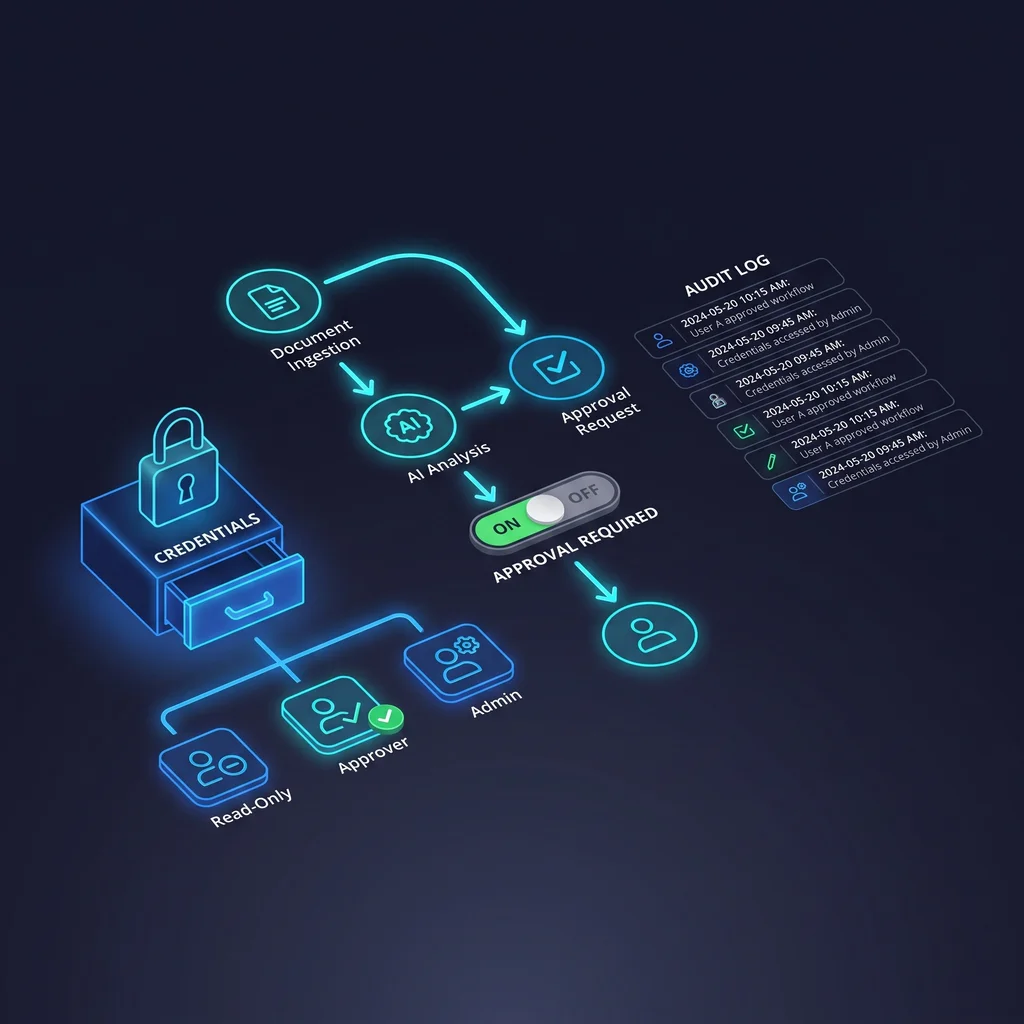
AI workflow automation is moving past simple chat. Business owners are starting to ask assistants to inspect systems, suggest changes, draft automations, and sometimes trigger work across real tools. That can be useful, but it also changes the risk.
Once an assistant can touch workflows, credentials, users, executions, or security records, n8n AI permissions become an operating decision, not just a technical setting.
The public n8n MCP server listing describes tool surfaces for workflow management, execution management, credential operations, user management, and security audit access. For a Kansas business owner, that means the same assistant that can help clean up a process may also be close to actions that affect customers, staff, billing, or reporting.
The answer is not to avoid AI. The answer is to put a ladder in front of it. Each rung gives the assistant only the authority needed for the next kind of work.
Operators are moving from “AI answers questions” to “AI acts inside business systems.” That shift is useful, but it deserves a different kind of setup.
A chat assistant that summarizes notes is one thing. An assistant connected through an n8n MCP server is different. It may be able to inspect workflows, review executions, interact with credential-related surfaces, view users, or support security-audit work. Those are powerful areas of the business stack.
For small teams, the danger is not usually a dramatic failure. It is a quiet mistake: a workflow gets changed without enough review, a customer receives the wrong message, a record is updated in the wrong system, or an owner cannot tell who approved what.
AI should earn permission in stages. Let it inspect before it suggests, suggest before it drafts, draft before it executes, and leave an audit trail after it acts.
This is where Expert AI Services keeps the conversation practical. Custom AI services should remove manual toil and software clutter, not make owners feel like they handed the keys to a tool they cannot supervise. You can learn more about that operating approach on the Expert AI Services about page.
A permission ladder separates thinking from doing. It keeps the assistant useful while preventing it from making a change before a person understands the impact.
Inspection is the safest first rung. At this level, the assistant can read workflow structure, node names, execution history, and error patterns. It cannot edit, run, delete, or reveal secrets. This lets the AI explain what exists before anyone asks it to change anything.
Suggestion rights let the assistant recommend improvements in plain language. It might point out a duplicate step, a fragile trigger, a missing notification, or a workflow that needs a cleaner handoff. Suggestions should stay separate from edits.
Drafting lets the assistant prepare a proposed workflow change, checklist, or configuration plan. For small business automation controls, this is where clarity matters. A draft should show what will change, what systems are involved, what credentials are needed, and what could go wrong.
Approval is the human checkpoint. A person reviews the proposal before anything runs. The approver should see the workflow name, requested action, expected result, systems affected, rollback plan, and risk level.
Execution rights should be narrow. Approval for one action should not give the assistant broad authority across every workflow. If the task is high impact, execution should be limited to the approved workflow and the approved change.
Audit is the final rung. After execution, the business needs a record of what happened, who approved it, what changed, and whether the result matched the proposal. Audit records turn automation from a black box into a manageable process.
Start by listing the actions your n8n MCP connection can expose. Put each action into one of three groups: read-only, draft-only, or execution-capable. Workflow inspection belongs in read-only. Proposed edits belong in draft-only. Running workflows, changing credentials, deleting workflows, changing users, and touching security audit data belong behind approval.
Next, separate credentials from normal workflow review. An assistant may need to know that a workflow uses a CRM, email account, spreadsheet, or ticketing system. It usually does not need to see the secret values behind those connections. Locked credential handling should be part of the setup before the assistant is invited into daily work.
Then require a structured action proposal for every high-impact step. The proposal should name the workflow, the requested action, the expected business result, the systems affected, the rollback plan, and the person approving it. This keeps approval from becoming a quick yes with no context.
Finally, review logs on a schedule. Audit records are only useful if someone checks them. A short weekly review is often enough for a small team that is just starting with AI workflow automation.
For a local service company, clinic, office, shop, or professional firm, the goal is not to build a complicated governance program. The goal is to keep useful automation from becoming another thing the owner has to worry about.
A bookkeeper should not need to wonder whether an assistant changed a workflow that sends invoices. An office coordinator should not have to guess why a customer message went out twice. A founder should not have to choose between speed and accountability.
With the right n8n AI permissions, AI can inspect broken steps, draft safer workflow changes, and prepare a clear approval request. People still make the judgment call. The assistant does the tedious review work around it.
Expert AI Services approaches this kind of work with a practical bias: less software clutter, more useful workflows, and clear ownership. The same mindset behind applied products like SMSai is useful here. AI should reduce manual follow-up and tool overload without hiding the decision trail.
If your team is already using n8n, the permission ladder can start small. Give the assistant read-only inspection first. Ask it to explain a workflow in plain language. Then let it suggest improvements. After that, allow draft changes in a staging area. Save execution for approved actions with a clear audit trail.
This approach keeps AI helpful without treating it like an employee with unlimited access. It also gives owners and operators a way to test value before expanding permissions.
If you are considering an n8n MCP server connection, build the MCP security checklist before the first production workflow is exposed. The best time to decide who can approve actions, how credentials stay protected, and where audit records live is before the assistant has the power to act.
Talk with an AI integration lead at Expert AI Services to explore how custom AI services can help your team build useful automation with the right permission ladder in place.
Process Type
Workflow automation governance
Time Saved
3-6 hours per week once safe workflow review and execution are delegated
Tools Used
n8n, MCP server, Claude or ChatGPT-style assistant, approval checklist, audit log
Before
AI can suggest automation ideas, but humans manually inspect workflows and worry about accidental changes.
After
AI can inspect and draft changes first, while execution and credential-sensitive actions require approval.