
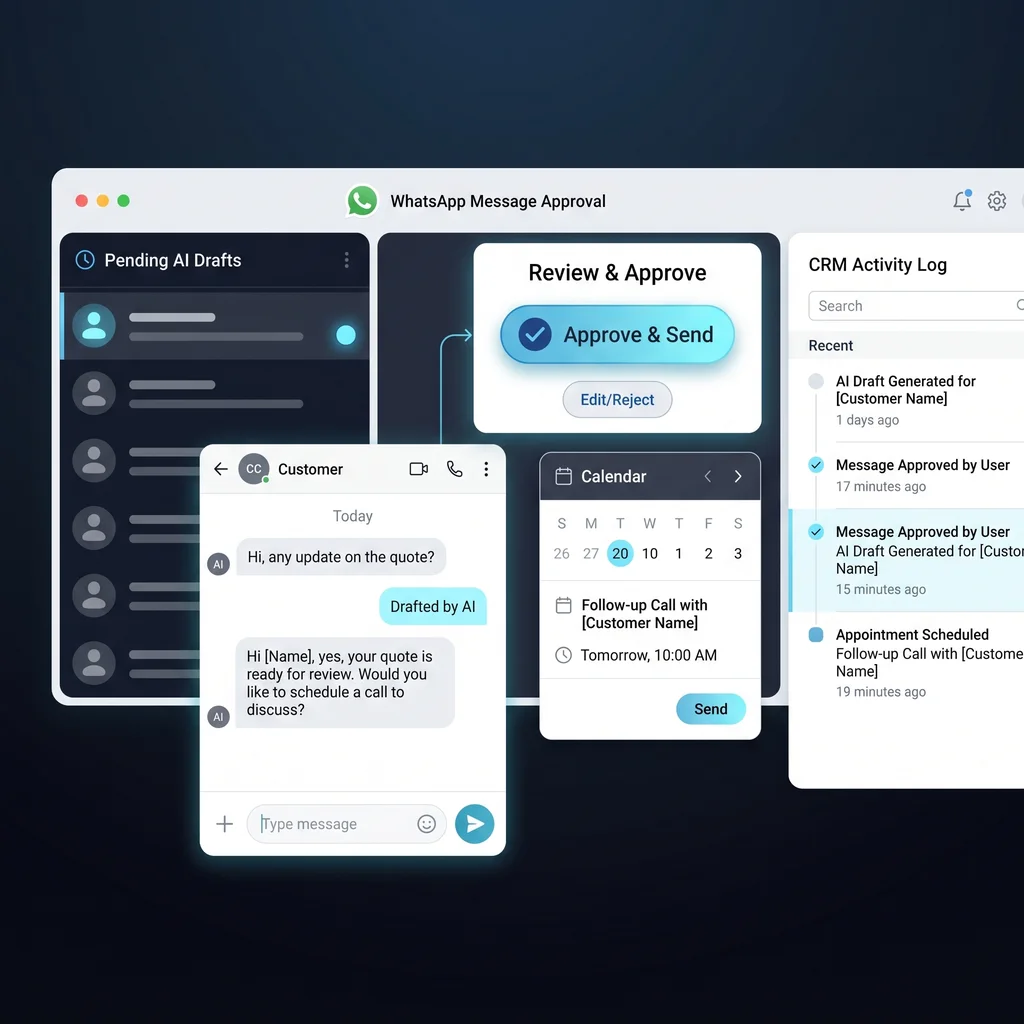
For a Kansas business owner, customer follow-up is usually not a fancy marketing problem. It is the missed appointment reminder, the quote that never got a check-in, the service question that sat in somebody's phone, or the sales note that did not make it back into the spreadsheet. WhatsApp automation can help, but only if it fits the way real teams work.
The safer pattern is not to let AI send every message on its own. The better first move is AI customer follow-up that drafts the next message, shows the reason, checks the customer record, and asks a person to approve anything that could affect trust. That keeps the speed of automation without pretending every customer conversation is the same.
WhatsApp is personal. People use it for family, vendors, appointments, and quick business updates. When a company sends a message there, tone matters. A follow-up that is too pushy, too vague, or sent at the wrong time can feel worse than no follow-up at all. That is why approval should be designed into the workflow instead of added after a problem happens.
Meta's WhatsApp Business Platform is built for business messaging through APIs, including notifications, reminders, customer care, conversational flows, routing, and integration with systems such as CRM and marketing tools. A public MCP connector shows the technical idea in simple form: a tool can accept a phone number and message, then send through the Meta WhatsApp Business API when the right credentials are configured. That is useful plumbing. It is not, by itself, a finished customer process.
Good automation should make the next right action easier to review, not harder to explain.
An approval step gives the owner, coordinator, or sales lead a clean place to catch context the AI may not know. Maybe the customer already called. Maybe the job is on hold. Maybe the message needs a softer tone because the last interaction was tense. The AI can prepare the draft, but the business keeps judgment where it belongs.
A useful first version does not need a huge platform. For many small teams, the stack can be a WhatsApp Business Platform connection, a secure connector or MCP server, a CRM or spreadsheet log, and an AI draft assistant that follows clear instructions. The goal is small business automation that removes remembering, copying, and logging from the team's day.
The draft queue is where follow-ups wait before anyone sends them. Each item should show the customer name, phone number, last contact date, reason for the message, proposed wording, and the source record that triggered it. A staff member should be able to approve, edit, skip, or escalate. That is the difference between a tool that sends messages and a workflow that the team can trust.
Approval rules should be boring and specific. Low-risk reminders can go to one queue. Pricing questions, complaints, cancellations, or unclear records should go to a manager. Anything outside the customer's opt-in or messaging rules should stop before a draft is sent. If a template is required for a business-initiated message, the system should make that visible instead of hiding policy details from the person approving the send.
After approval, the message should be logged automatically. The log does not have to be complicated. It should capture who approved the message, when it was sent, what record triggered it, and whether the customer replied. This is where WhatsApp automation starts saving real time, because the team no longer has to send a message in one place and update the record somewhere else.
The review step matters most when the message could change the relationship. A payment reminder, missed appointment note, quote follow-up, or post-service check-in may be routine, but customers do not experience those messages as routine if the timing or tone is wrong. Staff review protects the business from sounding careless at the exact moment it is trying to be helpful.
For Kansas operators, this is practical risk management. Many businesses grow on referrals, repeat customers, and direct relationships. A message that sounds human and accurate helps. A message that feels automated in the wrong way costs more than the few minutes it saved.
The contract for this workflow estimates 3-6 hours per week saved for a small service or sales team. That estimate comes from removing the small repeated tasks: remembering who needs a check-in, writing the same type of reminder, copying numbers, updating records, and asking whether someone already followed up. The AI handles the first pass. The person handles the judgment.
This is the same practical lens Expert AI Services uses across custom AI services: less software clutter, more useful workflows, and a model-agnostic stack that fits the job. The SMSai product is one example of turning customer messaging into a scoped, usable workflow instead of a loose chatbot idea. The local team behind Expert AI Services also matters because Kansas businesses often need an integration partner who understands the pace, trust expectations, and operating reality of regional companies. You can learn more on the about page.
The best result is not a fully autonomous support desk. It is a reliable follow-up lane where staff see what is ready, approve what is safe, and spend less time chasing notes across phones, inboxes, and spreadsheets.
Start with one message type. Appointment reminders, quote check-ins, and post-service follow-ups are good candidates because the trigger is clear and the business value is easy to see. Define the trigger, the draft instructions, the approval path, the send rule, and the log fields before adding more automation.
Then test it with real examples from the business. Does the AI know when not to send? Does the approval screen show enough context? Can staff edit quickly? Does the CRM or spreadsheet update after approval? Can the owner audit what happened later? These questions matter more than the model choice.
Once the first workflow is stable, the same pattern can expand to other customer follow-ups. The point is not to replace the people who know the customers. The point is to give them a cleaner queue, better drafts, and fewer loose ends at the end of the week.
Talk with an AI integration lead when you are ready to turn WhatsApp follow-up from a manual habit into an approved, logged, and measurable workflow.
Process Type
Customer follow-up messaging
Time Saved
3-6 hours per week for a small service or sales team
Tools Used
WhatsApp Business Platform, MCP connector, CRM or spreadsheet log, AI draft assistant
Before
Staff manually remember follow-ups, copy messages, and update records after the fact.
After
AI drafts messages, staff approve exceptions, and approved follow-ups are logged automatically.