
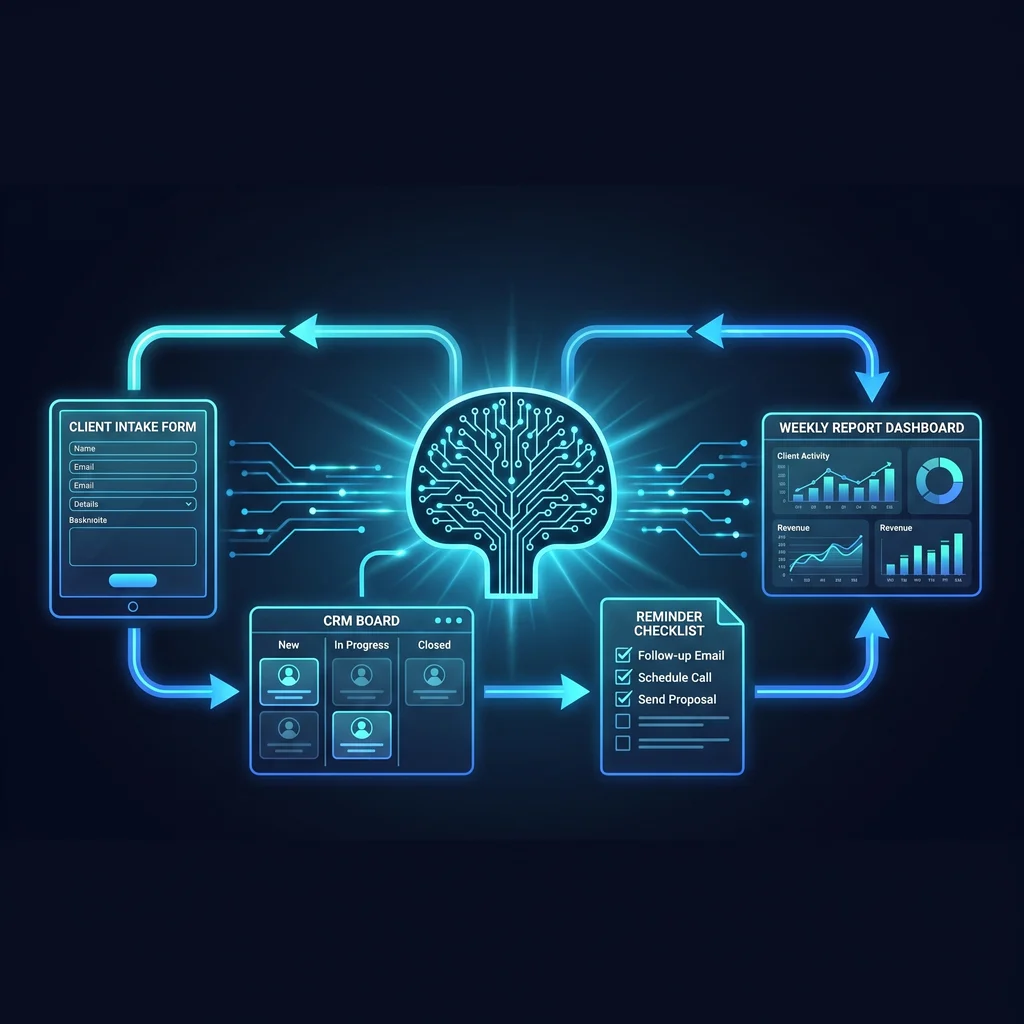
Kansas owners are hearing plenty about AI agents, but most professional-services firms do not need a roaming digital worker as their first move. They need cleaner handoffs. When a new client request lands in an inbox, then moves to a form, then waits on a calendar invite, then gets summarized in a spreadsheet, the team loses time before the real work starts. Professional services automation should begin there: with the repeatable steps that already happen every week and already have a human owner.
The source material behind this topic points to the same practical cluster of admin work: intake, handoffs, reminders, reporting, and CRM hygiene. Those are not glamorous problems. They are the daily work that keeps service firms moving. For Kansas business owners, that makes them the right first place to apply AI workflow automation because the goal is not to replace judgment. The goal is to keep good people from chasing the same loose ends all week.
A broad AI agent project sounds useful because it promises one smart system that can do many things. In practice, a client handoff usually fails for smaller reasons. A form is missing a field. A coordinator has to retype notes into the CRM. A founder forgets to send a follow-up after a discovery call. A status report takes longer to assemble than it should because the work is split across email, a project board, and a spreadsheet.
Most firms can find the leak by watching what happens after a client says yes. Someone creates a folder, schedules a kickoff, opens a task list, copies contact details, sends a welcome note, and reminds the client what is still needed. If any step depends on memory, the whole process gets fragile. Client onboarding automation is not about making the relationship feel mechanical. It is about making sure the basics happen the same way every time.
AI agents need access, permissions, prompts, logs, and failure handling. If the underlying handoff is unclear, an agent only moves confusion faster. A better sequence is to map the workflow first, automate the predictable pieces, and keep human checkpoints where client trust, scope, pricing, or judgment matters.
Automate the handoff before you automate the decision.
Start with the path a client already follows. A practical map can be as simple as five columns: trigger, information needed, system of record, owner, and next action. For example, a new website inquiry may trigger an intake form review, CRM record creation, calendar link, internal assignment, and reminder if the client does not respond. Nothing in that list requires a speculative agent. It requires a clean workflow.
This is where small business process automation earns trust. The team can see what changes. The owner can approve each step. The coordinator can point to the place where information now lives. If the workflow breaks, it is narrow enough to fix without stopping the whole business.
CRM cleanup automation is one of the best early targets because messy records create downstream waste. The workflow can flag missing company names, standardize lead stages, add follow-up dates, and remind the right person when a record has gone stale. AI can help summarize notes or classify request types, but the first win is usually consistency, not cleverness.
A useful handoff workflow connects the tools your team already uses: CRM, intake forms, calendar, email, Slack, Zapier, or n8n. The exact stack matters less than the operating rule. Every automated step should have a clear trigger, a visible output, and a person who owns the exception. That keeps automation from becoming another mystery system people work around.
For example, a professional-services firm might route every completed intake form into the CRM, create a kickoff checklist, send an internal Slack notice, draft a client welcome email for review, and schedule a reminder if the client has not sent required information. A weekly report can pull from the same system instead of forcing someone to rebuild the story by hand.
AI is most useful in these workflows when it reduces reading, sorting, and rewriting. It can summarize intake notes, draft a plain-language project brief, classify the request, or turn a status update into a client-ready paragraph. The human still reviews the message before it goes out. That is the difference between dependable AI workflow automation and a tool that makes the team nervous.
Even a simple handoff workflow should respect access boundaries. Not every user needs the ability to edit billing fields, change scope, or send client-facing messages. Start with read-only or draft-only steps where possible. Add write access only when the workflow has been tested and the team knows what the automation will change.
Kansas businesses tend to value straight answers, reachable partners, and systems that make the workday less scattered. That is a good filter for automation. If a proposal starts with a vague promise that an agent will handle everything, slow down. Ask which handoff gets fixed first, what system remains the source of truth, how exceptions are routed, and what evidence the team will see when the workflow runs.
Expert AI Services approaches this work as custom AI services, not a one-size tool rollout. The goal is less software, more useful workflows. Owners who want to understand the local team can start with the Expert AI Services about page. For a concrete example of applied automation, SMSai shows how a focused workflow can handle communication without forcing people into more software tabs.
Begin with one coordinator-heavy workflow. Pick something that happens often, causes follow-up work, and has a clear before and after state. Client intake is usually a strong first choice. Reporting, reminders, and CRM cleanup are close behind. Write down the current before state: work scattered across inboxes, forms, spreadsheets, and manual reminders. Then define the after state: intake, reminders, status updates, and reporting move through a repeatable workflow with human checkpoints.
From there, build in small passes. First, standardize the intake fields. Next, connect the form to the CRM. Then add reminders and internal notifications. After that, use AI to summarize or draft where the team already spends time writing. Measure what changes in hours saved, dropped follow-ups, cleaner records, and faster client updates. The provided planning estimate for this kind of coordinator-heavy workflow is 2 to 5 hours per week, but each firm should validate that number during discovery rather than treating it as a guarantee.
The right first automation project should feel almost plain. It should remove repeated handwork, protect client communication, and give the team more confidence in what happens after a client says yes. Once those handoffs are clean, AI agents become easier to evaluate because the business finally knows which systems they should touch, what permissions they need, and where human review still belongs.
Process Type
Client intake, handoff, reminder, reporting, and CRM hygiene automation
Time Saved
Estimate to validate during discovery: 2-5 hours per week for each coordinator-heavy workflow
Tools Used
CRM, intake forms, calendar, email, Slack, Zapier, n8n
Before
Work is scattered across inboxes, forms, spreadsheets, and manual reminders.
After
Intake, reminders, status updates, and reporting move through a repeatable workflow with human checkpoints.