
AI workflow permissions should be decided before an AI agent gets anywhere near a live n8n workflow. Once a workflow can read records, draft replies, update tools, or call an MCP server, the question is no longer whether the automation works. The question is who gave it permission to act.
For Kansas business owners and operators, that matters. Most teams are not trying to chase every new AI feature. They are trying to answer customers faster, reduce manual follow-up, and keep work moving without adding more software clutter. That is exactly where n8n automation can help, but only when access is staged carefully.
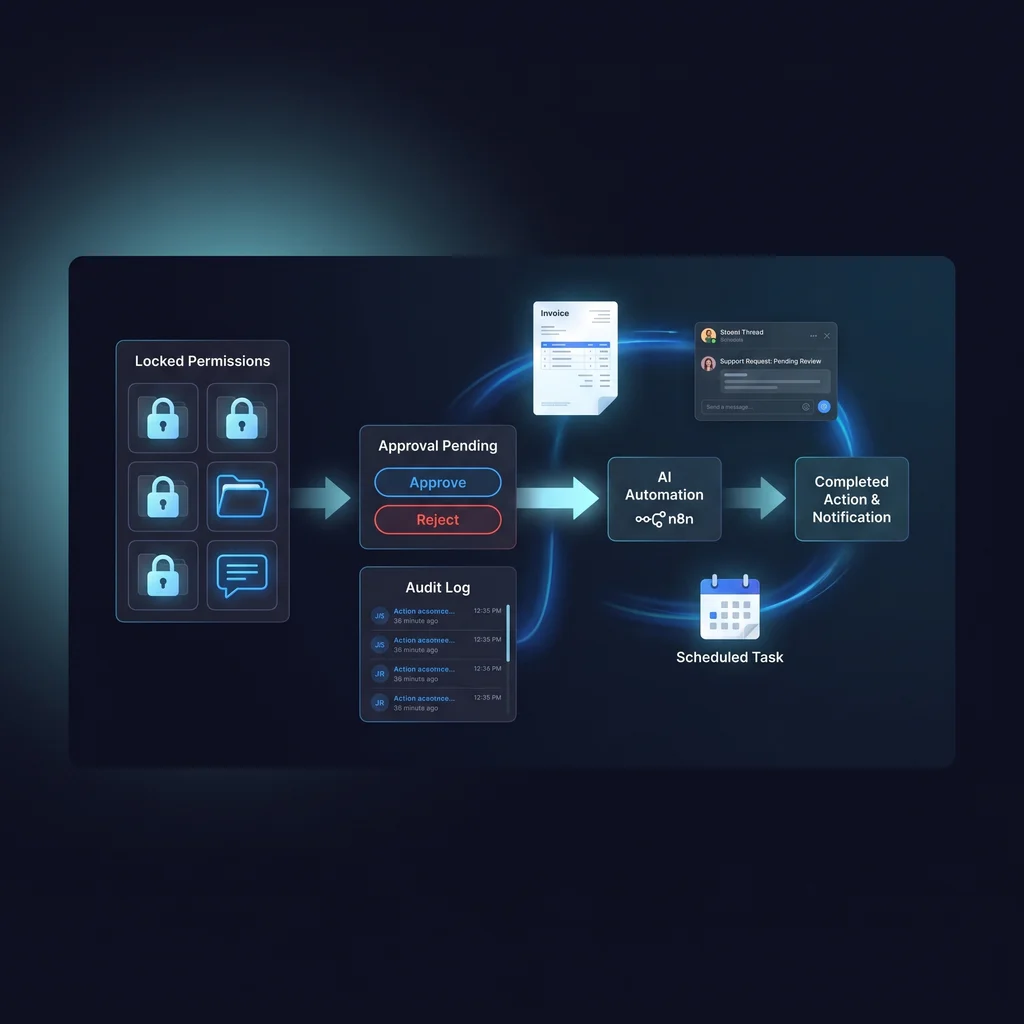
A permission ladder gives the owner a simple operating model: inspect, draft, approve, execute, and audit. It keeps AI useful without giving it a blank check.
Small business automation usually starts with a practical need. A message comes in. A form is submitted. A customer needs a follow-up. A record needs to be checked. n8n can connect those steps across tools, and an AI agent can help interpret the work.
The risk appears when the AI moves from reading information to taking action. Reading a ticket queue is one level of access. Drafting a customer response is another. Sending that response, changing a status, or updating a system of record carries more responsibility.
Before AI manages a workflow, decide what it can see, what it can prepare, what needs approval, and what must be logged.
This is where AI agent security becomes operational instead of theoretical. The goal is not to slow the team down. The goal is to make sure automation is clear enough that an owner, coordinator, or manager can review it and trust it.
A permission ladder works because it separates access into levels. Each level gives the AI enough room to be helpful without jumping straight into full authority.
Inspect-only is the safest place to start. The AI can read approved information, summarize records, identify missing details, or suggest the next step. It cannot send messages, update systems, or trigger outside actions.
This level is useful for first tests because it shows whether the AI understands the workflow. If it cannot summarize the work correctly, it should not be allowed to act on that work.
Draft-only access lets the AI prepare work for a human. It might draft a follow-up email, prepare an internal note, summarize a support thread, or suggest a task. A person still decides what gets used.
This is often the best early stage for Kansas operators. It reduces blank-page work and repeated typing, but it keeps judgment with the team. Expert AI Services uses this kind of practical thinking across custom AI services because useful automation should support working people, not bury them in mystery steps.
Approval-required access is where n8n automation becomes more powerful. The AI prepares the action, n8n routes it to the right reviewer, and the workflow waits. Nothing moves forward until a person approves it.
Approval gates are especially helpful when workflows touch customers, pricing, scheduling, account records, or commitments. They also make training easier. A manager can review what the AI suggested, approve what is right, and correct what is not.
Auto-execute access should be earned. Use it only for repeatable, low-risk actions with clear rules and a rollback path. Examples might include tagging a record, moving a completed item to an archive list, or sending an internal notification after required checks pass.
If the action affects money, customer promises, sensitive records, or public communication, keep approval in place. The best automation is not the one with the fewest clicks. It is the one that the business can stand behind.
n8n is useful because it connects business tools into repeatable workflows. An MCP server can make AI access more structured by exposing approved actions as tools. That is better than letting an AI wander through browser screens or improvise around unclear permissions.
The public source signal behind this topic points to the same implementation boundary: browser-style automation and API-backed tool access are not the same thing. When a workflow action is exposed through a named tool, the business can define inputs, limits, approvals, and audit logs.
That is the practical heart of AI workflow permissions. The AI should not simply “use the system.” It should call a specific approved action, with a specific purpose, under a specific permission level.
For example, a workflow might allow the AI to read recent support context, draft a reply, and send that draft to an owner for approval. It should not let the AI delete a customer record, change account terms, or send a message when required fields are missing.
A useful first map does not need to be fancy. Set aside one to two hours and pick one workflow. Do not start with every inbox, every customer, or every internal tool. Choose a narrow path where the team already knows what good work looks like.
Write the workflow in plain language. What starts it? What information does the AI need? What can it inspect? What can it draft? Who approves the next step? What should be logged? What should stop the workflow?
Then write the hard no list. The AI may not delete records. It may not change billing terms. It may not make commitments outside approved language. It may not continue when required data is missing. It may not override a human rejection.
This kind of map helps owners avoid two common mistakes. The first is giving AI too much access because the demo worked once. The second is blocking useful automation because the permissions feel vague. A ladder solves both by giving each action a place.
Audit logs should not be treated as a technical afterthought. They are how the business knows what happened. A useful log should show what the AI reviewed, what it drafted, what tool it called, who approved it, when it ran, and what changed.
That log protects the team. If a customer asks why a message was sent, the business can see the approval path. If a workflow fails, the team can find the step. If the AI keeps making the same weak suggestion, the owner has evidence to improve the process.
For teams exploring applied AI, examples like SMSai show why practical communication workflows need clear boundaries. The same principle applies to n8n automation: make the useful path easy, make the risky path require approval, and make every important action visible.
AI can be a strong helper when it is connected to the right work with the right limits. It can reduce manual logging, prepare follow-ups, check records, and help teams move faster. But it should not manage business workflows without a permission ladder.
Start with inspect-only. Move to draft-only. Add approval gates. Reserve auto-execute for narrow, low-risk actions. Keep audit logs close enough that a busy owner can understand what happened without digging through technical noise.
Expert AI Services helps businesses build model-agnostic, practical AI workflows around real operating needs. To talk through where AI belongs in your workflow and where it should wait for approval, connect with the local team.
Difficulty Level
Intermediate
Action Item
Define inspect-only, draft-only, approval-required, and auto-execute permissions before connecting AI to workflows.
Tools Mentioned
n8n, MCP, AI agents, audit logs, approval gates
Time to Implement
1-2 hours for a first permission map