
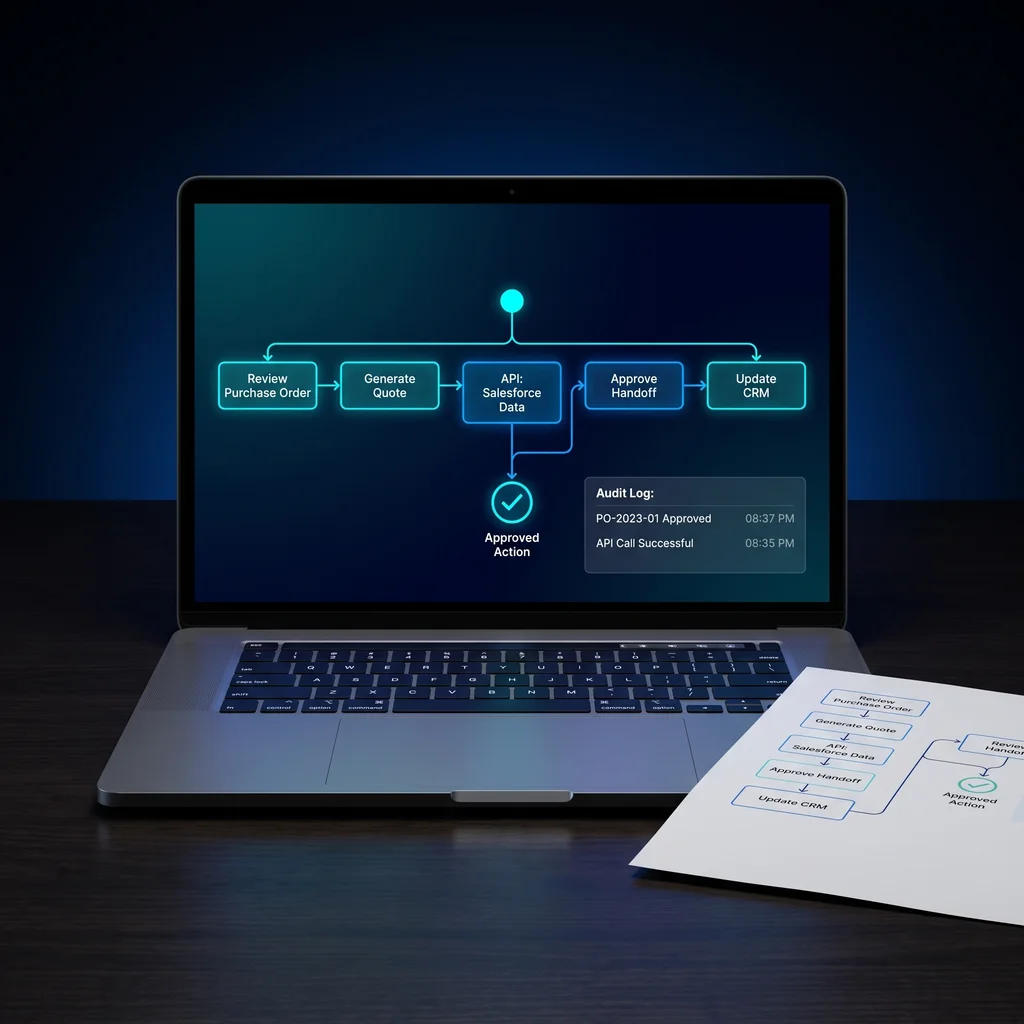
Kansas business owners are starting to move past simple AI chat and one-off connectors. The next step is more serious: AI agents that can reach order systems, customer records, scheduling tools, invoicing platforms, and internal knowledge. That can save time when it is designed well. It can also create confusion when the agent receives a long list of raw technical buttons and no clear business rules.
The practical answer is to design MCP tools for business automation around approved business actions, not around every endpoint a software system exposes. The Model Context Protocol can help an agent use outside tools, but the business still has to decide what those tools mean in plain operating terms.
For an owner or operator, the question is not just whether an AI agent can connect to a system. The better question is: what work is the agent allowed to do, under what limits, and who can review it?
Many business automation APIs are built for software developers. They may include separate endpoints for customers, orders, payments, notes, products, status updates, and messages. That structure makes sense for code. It does not always make sense as a menu for AI agent tools.
If an agent sees too many low-level actions, it has more chances to choose the wrong one, combine steps in a brittle way, or take action without the right business context. The result is not smarter automation. It is a process that takes more review because the team has to untangle what happened.
Good AI tool design turns technical access into a short list of business actions that a person can understand, approve, and audit.
That matters for small businesses because owners usually do not have extra staff waiting around to police software behavior. The workflow needs to be understandable from day one. A manager should be able to look at the tool list and know what the agent can and cannot do.
A safer pattern is to wrap technical endpoints inside business actions. Instead of exposing every order field, create a tool named lookup_customer_order_status. Instead of giving broad invoice access, create prepare_invoice_review_packet. Instead of letting the agent create shipping records directly, create draft_shipping_label_request.
Those names are not just cleaner. They define the job. They tell the agent what kind of work is allowed, and they tell the human reviewer what to expect. That is the difference between handing over raw access and building safe AI workflows that match how the business already operates.
Tool names should sound like business steps, not database operations. A Kansas retailer, service company, manufacturer, or professional office should be able to read the list without needing a developer beside them. If the name requires a technical explanation every time, it probably needs to be narrowed or renamed.
Plain names also help with training and support. When a coordinator sees that an agent used prepare_invoice_review_packet, the next step is clear. When the log says the agent used update_record_v2, the team has to ask more questions.
A short tool menu is easier to test and easier to trust. It helps the agent focus on the right kind of action instead of sorting through every possible operation. It also helps the owner decide what should be automated now and what should stay manual until the process is better understood.
This is where MCP tools for business automation become an operating design choice, not just a technical integration. The tool menu should reflect the work the business wants to approve: look up, prepare, draft, summarize, route, flag, and request review.
Safe defaults should be part of the tool contract. Read-only access should come first. If the agent only needs to gather order status, it should not also be able to edit the order. If it only needs to prepare an invoice packet, it should not also send the invoice or collect payment without a person approving the step.
Approval gates are especially important for actions that affect customers, money, inventory, account status, or public communication. The agent can prepare the work, assemble the evidence, draft the message, and point out missing information. A person can make the final call.
Audit logs matter just as much. Each tool call should leave a record of the action name, input, output, time, user or agent session, and review status. That does not need to become a burden for the team. It simply gives the business a clean trail when someone asks why a message was drafted, why an invoice packet was prepared, or why an order was flagged.
You do not need to be an MCP engineer to ask useful questions. Ask whether the proposed system exposes raw APIs or approved business actions. Ask which tools are read-only. Ask which ones can change records. Ask what requires human approval. Ask how tool calls are logged. Ask how the team can remove or narrow a tool later.
Those questions protect the business from tool sprawl. They also make vendor conversations more concrete. A builder who can explain action names, approval gates, and audit logs is thinking about operations. A builder who only talks about connecting everything may not have designed the workflow far enough.
Expert AI Services takes that practical view of custom AI services. The point is less software, more useful workflows. Products like SMSai show how AI can support real communication work without making the team chase another complicated dashboard. The same principle applies to MCP and AI agent tools: simplify the work around the people who already carry the business.
Before giving an agent access to company systems, write the tool list in plain English. Each tool should map to a specific business action. Each action should have a clear input, a clear output, and a known review point. If the action can affect money, customers, inventory, or official records, it should require approval until the business has tested it carefully.
Then check the list for clutter. If two tools overlap, combine or clarify them. If one tool does too much, split it. If a tool name sounds technical but the work is operational, rename it. This is not paperwork for its own sake. It reduces rework and review time by preventing brittle endpoint-by-endpoint automations.
For Kansas businesses, the best AI systems will not be the flashiest ones. They will be the ones that fit the way work actually gets done: clear steps, useful defaults, and a reliable record. To learn how a local team approaches that kind of practical AI integration, visit Expert AI Services.
Process Type
AI agent tool design and workflow automation
Time Saved
Reduces rework and review time by preventing brittle endpoint-by-endpoint automations
Tools Used
MCP, business APIs, approval workflows, audit logs, agent tool menus
Before
The business exposes too many raw API actions to an AI agent, increasing confusion and risk.
After
The agent receives a short set of approved business actions with clear inputs, safe defaults, and human review for risky steps.