
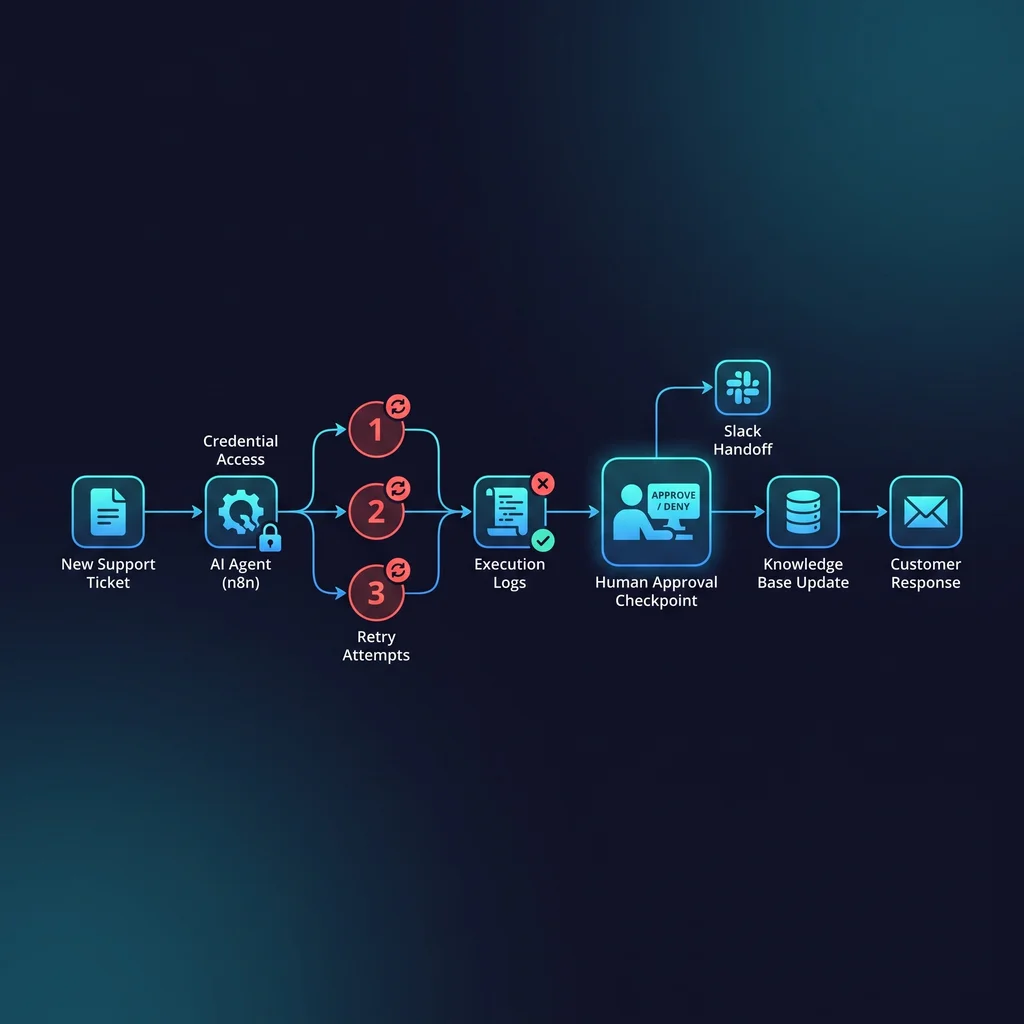
AI agents are getting closer to the systems that actually run a business. For Kansas owners and operators, that is the point where the conversation changes. It is no longer only about which AI tool can write a cleaner email or summarize a meeting. It becomes a working question: what can this agent touch, what happens if it fails, and who has the authority to stop it?
That question matters with n8n because workflow tools sit near the handoffs that keep a business moving. A workflow might update a record, send a message, create a task, move a lead, or trigger another system. When an MCP n8n server gives an AI-connected environment visibility into workflows, executions, credentials, and audits, the upside is real. So is the need for n8n AI automation safety before anyone connects the agent to live operations.
Before an agent can run a workflow, it should have a written limit on retries, access, approvals, and failed-run review.
Most teams are comfortable letting AI suggest. The risk profile changes when AI can act. AI workflow automation can reduce manual logging and tool-hopping, but only when the work is bounded. If an agent can inspect a workflow, trigger an execution, or use stored credentials, the business needs operating rules that are visible to the owner, not buried in a technical setup.
The public MCP n8n server materials point toward the same practical concern: workflow management, execution visibility, credential handling, and audit behavior are all part of the implementation conversation. That does not mean small businesses should avoid automation. It means automation should start with guardrails that match the real business process.
A useful agent does not need every permission on day one. It needs the smallest amount of access required to help with the current workflow. Read-only access is often enough for early testing. Limited write access may be appropriate after the team has reviewed logs and edge cases. Actions that affect customers, money, publishing, or vendor records should require approval until the business has proof the workflow behaves correctly.
An agent failure budget is a plain rule for how much failure the business will tolerate before a person steps in. It might include a maximum retry count, a failed-run threshold, a required approval step, a list of blocked actions, and a named owner for review. This is not corporate theater. It is the same kind of practical limit a good operator already uses when deciding when to pause a process and look at the facts.
For example, an agent may be allowed to prepare a customer follow-up, but not send it until a person approves it. It may be allowed to retry a workflow once after a temporary error, but not five times. It may be allowed to flag a missing field, but not overwrite the record. Those limits are the difference between helpful automation and a system that quietly creates cleanup work.
The stop rule should be written in the workflow notes, approval queue, or runbook. If only the developer knows the limit, the business does not really own the automation. A Kansas operator should be able to open the run history and understand why the agent stopped, what it tried, and what decision is needed next.
Automation approval gates should come before broad credentials. Credentials are not just technical keys; they are business authority. If an agent can use a credential, it can often create real work for someone else. That is why the safest rollout starts by scoping credentials to the specific workflow and separating suggestion from execution.
A practical setup might give the agent permission to inspect a workflow and summarize a failed execution, while owner approval is required before re-running a job that sends messages or changes records. This keeps AI useful without asking the team to trust a black box. It also creates a cleaner audit trail when someone asks what happened.
Expert AI Services approaches this as custom AI services, not tool collecting. The goal is less software, more useful workflows. Products like SMSai show how applied automation can support communication without making the business feel buried in another platform. The same mindset applies here: give the team a controlled workflow they can understand, review, and improve.
The first n8n agent workflow should be narrow. Choose a repeatable internal process with a clear owner, known inputs, and a low-risk rollback path. Do not start with the workflow that touches the most customers or carries the highest financial impact. Start where the team can learn quickly and safely.
After controls are in place, the expected time savings may be 3-5 hours per week, especially where employees are currently checking logs, copying updates, or waiting on routine approvals. But that savings only holds if failed runs are reviewed. A failed run is not just an error message. It is evidence that the workflow needs a better rule, clearer data, or a tighter permission boundary.
When a run fails, review four things: what the agent tried to do, which credential or workflow it used, how many times it retried, and whether a human approval gate worked as intended. If the answer is unclear, the agent should not receive more access yet.
Before giving agents production n8n access, ask a short set of owner-level questions. Can the agent only touch the workflow it needs? Are risky actions routed through approval? Is there a retry limit? Can someone read the execution history without guessing? Is there a named person responsible for failed-run review?
If those answers are not ready, the project is not behind. It is simply at the stage where the controls need to catch up with the tool. That is normal. Operators are moving from prompt experiments into real AI-assisted workflow execution, and the operating model has to mature with it.
For a grounded rollout, talk with an AI integration lead who can map the workflow, define the failure budget, and keep the automation useful without handing an agent more authority than the business is ready to manage.
Process Type
AI-assisted workflow orchestration
Time Saved
3-5 hours per week after controls are in place
Tools Used
n8n, MCP server, execution logs, approval queue
Before
Agents can suggest or trigger automations without clear retry limits, credential scope, or failed-run review.
After
Every agent-triggered workflow has access rules, run history, stop conditions, and owner approval for risky actions.