
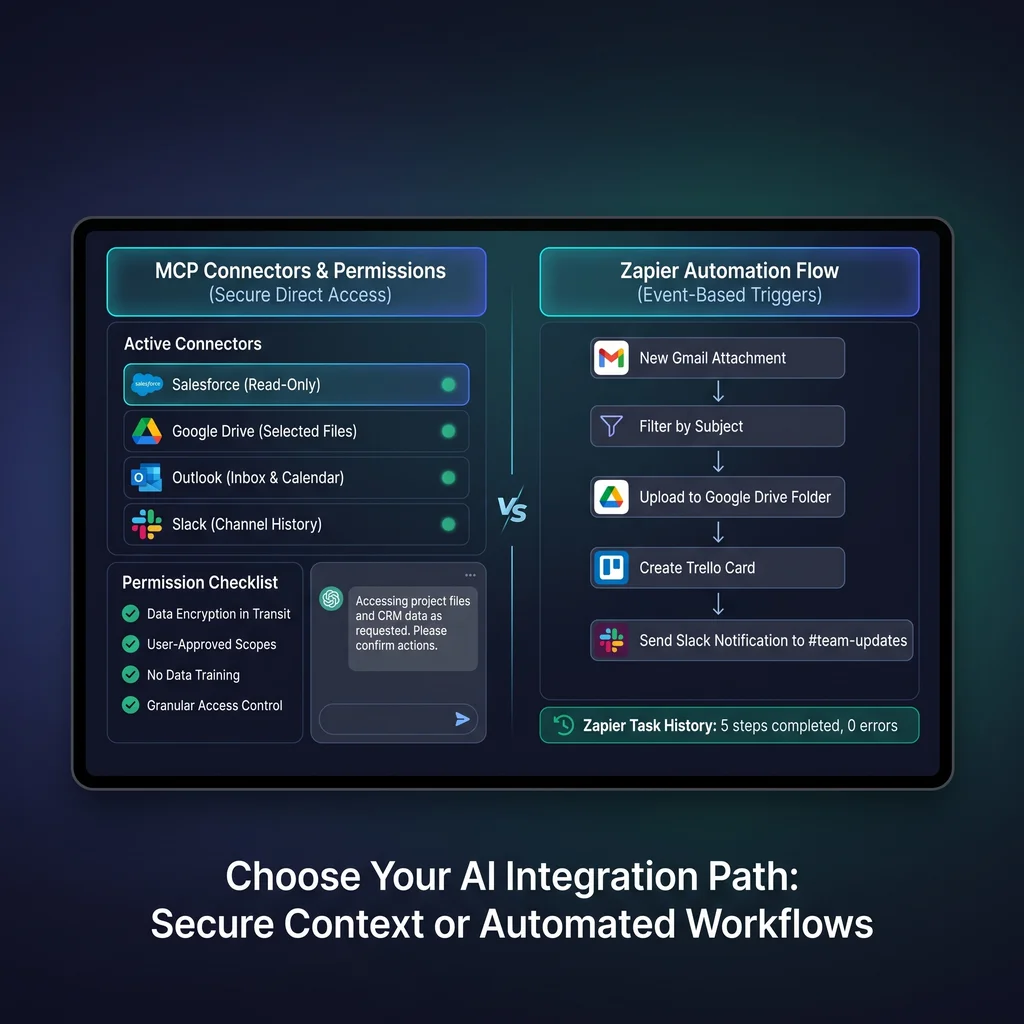
Kansas business owners are past the stage of asking only which AI model is best. The better question is which systems AI should touch. That question matters because AI tool integrations can summarize sales trends, prepare a customer follow-up, or update a CRM, but the wrong connection can also create cleanup work. The practical choice is not MCP versus Zapier as a technology contest. It is whether the workflow needs a simple automation, a read-only report, a direct API build, or governed AI tool access.
MCP for small business is useful when an AI assistant needs to reason across tools and request actions inside a permissioned layer. Zapier automation is usually better when the job starts with a clear event and ends with a predictable action. Owners do not need to chase whatever connector is newest. They need the smallest connection that gets the work done and can be explained to the person responsible for it.
Before connecting anything, name the job in plain language. 'When a new quote request arrives, create a task and notify the right person' is a Zapier-shaped job. 'Let an assistant compare ad performance, suggest budget changes, and prepare a report across several platforms' starts to look more like MCP. 'Show me weekly numbers from three tools, but do not write anything back' may only need read-only reporting.
This first step keeps the AI workflow setup grounded. A Wichita retailer, a Topeka professional firm, or a Salina manufacturer may all want better follow-through, but the workflows are different. The connector should fit the operating habit, not force the business into a new software routine.
The right integration is the smallest connection that improves the work and still leaves ownership clear.
Zapier defines a Zap as an automated workflow built from a trigger and one or more actions. That is the right shape for many business tasks: a form submission creates a CRM lead, a paid invoice sends a message, or a support request creates a follow-up task. The workflow is predictable. The fields are known. The outcome can be tested without giving an AI assistant broad access to the business.
For many Kansas operators, this is the practical starting point. If the process is repetitive, rule-based, and easy to describe as 'when this happens, do that,' use Zapier before MCP. It is faster to explain, easier to hand off, and usually enough for reminders, intake, notifications, list updates, and basic CRM hygiene.
Zapier is less useful when the workflow depends on judgment across several messy sources. A Zap can move data, but it does not automatically know whether a strange order, duplicate lead, or unusual customer note deserves special handling. Build the routine path first, then leave exceptions for a person or a reviewed AI assistant.
The official Model Context Protocol documentation describes MCP as an open standard for connecting AI applications to external systems. In plain terms, MCP can give assistants such as Claude or ChatGPT a standard way to discover tools, request data, and perform approved actions. That is different from a one-way automation. The assistant can ask for context, compare results, and take the next step if the connected tools allow it.
Blend MCP is a useful public example because it connects AI assistants to advertising platforms such as Google Ads, Meta, TikTok, Microsoft, and Pinterest. Its public materials describe OAuth authentication, encrypted transport, user-scoped permissions, read-only restrictions, and audit logging for write actions. Those details are the point. MCP is not just AI plus more buttons. It is a tool-access layer that needs permission boundaries.
The open-source U.S. Government Open Data MCP project shows another side of the pattern. Its README describes an MCP server and TypeScript SDK covering hundreds of tools across dozens of government APIs, with selective loading, caching, rate limiting, and retry behavior. That is powerful, but it also proves why small businesses should avoid connecting every possible tool on day one.
When an assistant can query data, call APIs, or prepare changes, the owner needs to know who approved access, what the assistant can see, what it can change, and where the log lives. MCP for small business makes the most sense when those answers are clear enough to survive a busy Monday morning.
If the problem is 'we cannot see what is happening,' do not start with write access. Build a read-only dashboard, scheduled report, or assistant prompt that summarizes approved data. This is the safest first move for sales trends, ad performance, open tickets, inventory snapshots, and weekly leadership updates. It gives the team better context without letting the tool change records.
Use Zapier automation when the workflow has a clean trigger, a known destination, and a clear owner. Examples include sending internal alerts, creating tasks, copying form data, updating a spreadsheet, or routing a new lead. Test the Zap with sample records, check the history, and make sure someone owns failures. This is not flashy, but it removes the manual logging and software switching that drains small teams.
Use MCP when the assistant must work across tools, ask follow-up questions of systems, or prepare actions from live context. Good candidates include multi-platform marketing review, internal knowledge search tied to business systems, or operational copilots that need a narrow set of approved actions. Start with read-only access, add write actions one at a time, and require approval for anything that changes money, customer records, permissions, or public-facing content.
The action item is simple: audit one workflow and decide whether it needs simple triggers, read-only reporting, direct API work, or governed AI tool access. Give yourself 30 to 60 minutes for the decision checklist. If MCP is still the right answer, run a one- or two-day pilot with one workflow, one owner, one assistant, and one clear rollback plan.
Expert AI Services favors less software and more useful workflows. A product like SMSai shows the practical side of applied AI: reduce manual back-and-forth, keep communication moving, and make the tool serve the people doing the work. For broader integration planning, a Kansas-based integration lead can help decide whether the right next step is Zapier, MCP, a direct API, or no new connector at all.
The winning choice is the one your team can trust, explain, and maintain. Start small. Keep permissions narrow. Prove the workflow with real business data. Then expand only where the connection saves time, reduces rework, or improves follow-through.
Difficulty Level
Intermediate
Action Item
Audit one workflow and decide whether it needs simple triggers, read-only reporting, or governed AI tool access.
Tools Mentioned
MCP, Zapier, Claude, ChatGPT, Blend MCP
Time to Implement
30-60 minutes for the decision checklist; 1-2 days for a controlled pilot