
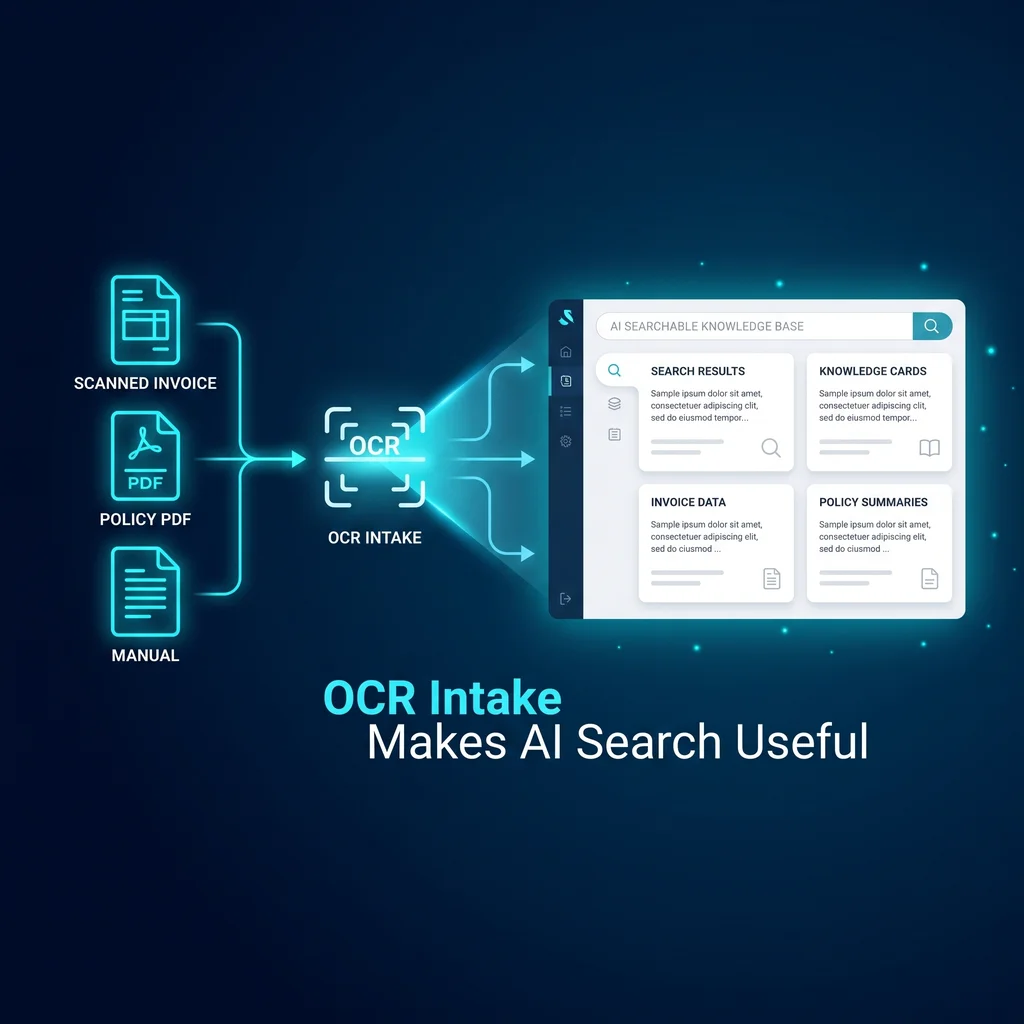
Most small businesses do not start with a clean knowledge base. They start with shared drives, scanned invoices, old policy PDFs, vendor packets, warranty pages, receipts, and folders named by whichever employee had time that day. That is why OCR for business documents matters before a company asks AI to search its files. If the words are trapped inside an image, the search tool has very little to work with.
For Kansas owners and operators, the problem is not abstract. A coordinator may know the answer is in a PDF somewhere, but not which version. A manager may remember a policy update, but not the filename. AI document search can help, but only after the documents are made readable, traceable, and organized enough for the system to cite the right source.
AI search is only as reliable as the text, file history, and review path it can point back to.
This case study uses a composite back-office team scenario, not a named client. The company has documents trapped in scans, image PDFs, email attachments, and inconsistent folders. Nothing is missing in the dramatic sense. The files exist. The trouble is that staff cannot reliably search them, and AI cannot confidently retrieve what it cannot read.
The team has invoices, policies, manuals, onboarding documents, and vendor paperwork. Some files are born-digital PDFs with selectable text. Others are scans from older records. A few are image-heavy packets where only part of the page can be copied. If an AI assistant is connected too early, it may answer from the clean documents while ignoring the scanned pages that contain the detail the operator actually needs.
The right first step is a PDF OCR workflow, not a chatbot demo. Expert AI Services would scope the work around intake: preserve source files, run OCR, review low-confidence outputs, label documents in a useful structure, and prepare the library for AI search. That gives the business a practical foundation instead of another tool that works only on the tidy files.
OCR turns text inside scanned pages and image-heavy files into machine-readable text. The Papers with Code OCR task page shows OCR as an active document-recognition problem, with models and benchmarks focused on reading text from images. The business lesson is straightforward: before retrieval can be trusted, the words on the page must be available to the system in a form it can index.
A useful intake workflow includes several plain steps. Keep the original files. Generate OCR text. Connect the text back to page-level source references. Flag low-confidence pages for review. Normalize filenames where it helps. Group documents by business use, not by whatever folder happened to be handy years ago. These steps are not flashy, but they are what make a business knowledge base dependable.
Every extracted answer needs a trail back to the source. If the OCR text says a policy changed, the team should be able to open the original PDF and confirm the page. That matters for trust. It also helps prevent AI from becoming a loose pile of copied text with no connection to the record the business actually relies on.
OCR is useful, but it is not magic. Poor scans, skewed pages, handwriting, stamps, faded toner, and complicated tables can all create weak output. A review path keeps those weak spots from becoming search results that look cleaner than they are. In practice, the system can mark pages for human review before they become part of the searchable library.
After intake, AI document search can answer different kinds of questions. Instead of asking someone to remember where a policy lives, the system can search the readable text and point back to a source file. Instead of opening ten PDFs to find a vendor clause, a user can search the business knowledge base and then inspect the cited page.
The value is not that AI replaces judgment. The value is that staff spend less time digging through files and more time checking the right information. Owners still decide. Managers still approve. Coordinators still know the business context. The system simply reduces the manual search work that slows everyone down.
This is also where a model-agnostic stack helps. The intake process should not depend on one chat model or one vendor interface. Clean source files, reviewed OCR text, and practical metadata can support several tools over time. That keeps the business from rebuilding the same document foundation every time software changes.
A business knowledge base is not just a folder with AI on top. It needs rules for what belongs in it, how updates are handled, and who reviews documents that affect customers, billing, compliance, or operations. For a small team, the rules do not have to be complicated. They just have to be repeatable.
A strong setup might define document types, source ownership, review status, and date rules. It may separate archived records from current operating documents. It may keep drafts out of search until approved. These decisions make the AI layer more useful because it is searching a library that matches how the company actually works.
The expected result in this scenario is a cleaner AI-ready document library with traceable source references. That is a modest statement, and it should stay modest. The work does not promise perfect answers. It creates a better starting point for search, chat, workflow automation, and staff support because the system can finally read the source material.
For Kansas businesses, that kind of practical improvement often matters more than a big software rollout. Fewer mystery folders. Fewer duplicate uploads. Fewer questions answered from memory when the record is sitting in a scan. Less software clutter, more useful workflows.
Expert AI Services helps companies turn messy operational information into custom AI services that people can actually use. The work starts with the business problem, not the model. For teams evaluating document search, the first conversation is often about intake, review, and source trust. Learn more about the local Expert AI Services team and how practical operating experience shapes the work.
Applied AI also needs proof that the team can ship useful systems. SMSai is one example of focused automation built around a real workflow instead of generic software noise. If your company is considering AI document search, talk with an AI integration lead about whether OCR intake should come before the search layer.
Client Type
Composite back-office team scenario
The Problem
Company documents are trapped in scans, image PDFs, and inconsistent folders.
The Solution
Run OCR intake, preserve source files, review low-confidence outputs, and organize documents before AI search.
Result
A cleaner AI-ready document library with traceable source references.
Result
Result
Conclusion