
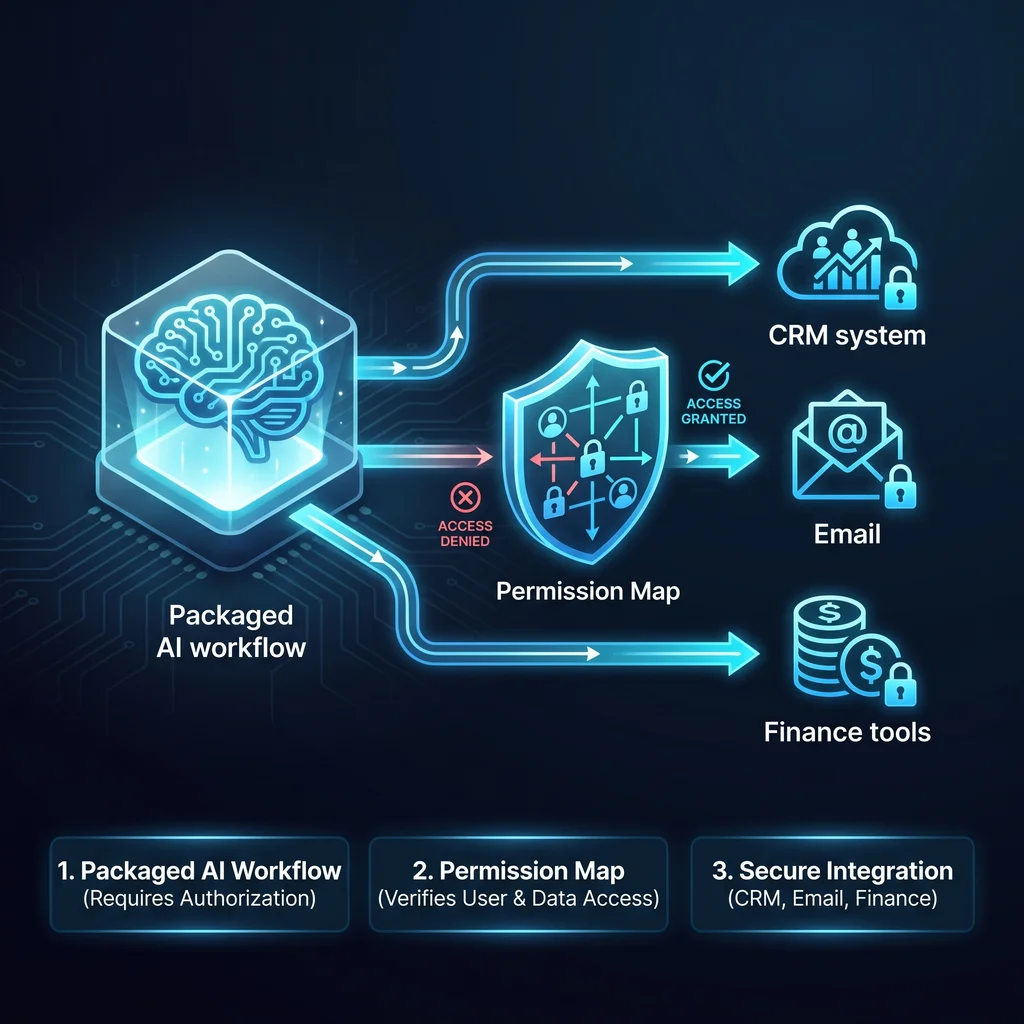
Packaged AI workflows are moving closer to the systems small businesses use every day. The conversation is shifting away from broad claims about AI agents and toward narrower work: intake summaries, scheduling drafts, pre-call briefs, document search, inbox triage, and internal handoffs.
That is a useful change for Kansas owners and operators. Most businesses do not need another dashboard. They need less software clutter, fewer copy-and-paste steps, and better coordination between the people already keeping the company moving.
But when AI gets close to CRM, email, and finance tools, the first question should not be, “Can it connect?” The better question is, “What is it allowed to do once it gets there?”
Packaged AI workflows can save time, but permission maps decide whether they are useful, reviewable, and appropriate for real business operations.
Anthropic’s Claude for Small Business announcement points toward a broader market shift. AI vendors are packaging workflows for business use, not just selling open-ended chat windows. That matters because small-business teams often need help with repeatable operational steps, not abstract AI experimentation.
For a service business, that may mean turning a web form into a clean project summary. For an office manager, it may mean drafting a follow-up email after a call. For a founder, it may mean preparing a briefing note before talking with a customer, vendor, or lender.
The value is practical. AI can organize context, draft routine communication, and reduce the manual logging that wears people down. Still, packaged does not mean finished. A workflow built for many businesses still has to be fitted to one business.
A permission map is a plain-language record of what an AI workflow can see, suggest, draft, update, send, and approve. It should identify the connected tools, the allowed actions, and the points where a person must review the work.
This is especially important for CRM, email, and finance systems. Reading a customer record is not the same as editing it. Drafting a customer email is not the same as sending it. Preparing an invoice note is not the same as changing payment terms.
CRM systems hold relationships, sales history, service notes, and commitments. An AI workflow may be safe to use for summaries, duplicate detection, or pre-call briefs. It may not be appropriate to let that same workflow change deal stages, overwrite notes, or create tasks without review.
A Kansas business owner should be able to point to the rule: the agent can summarize and draft, but a coordinator approves customer-visible changes. That is the level of clarity needed before automation becomes operational.
Email creates obligations because it speaks in the company’s name. Finance tools carry even more weight because they touch invoices, payments, vendor records, and sensitive business data. These systems deserve a higher approval bar.
A good first step is allowing AI to prepare drafts, flag missing information, and summarize threads. Sending messages, changing billing details, or updating financial records should remain gated unless the workflow has been carefully tested and the owner understands the risk.
The Model Context Protocol documentation describes a standard way for applications to provide context and tools to AI systems. This connector approach is important because businesses want AI agents to work across existing systems instead of rebuilding everything from scratch.
But connectors do not replace business judgment. A connector can expose useful tools and data, while the business still decides what actions are allowed. The technical path may become easier, but the operating rules still have to be designed.
That is where local implementation experience matters. Expert AI Services brings a practical background in building systems, controls, BAS, low-voltage work, and field coordination. Those environments teach a simple lesson: automation works best when boundaries are clear and failure modes are understood. Learn more about that operating background on the Expert AI Services about page.
Current research on tool-using agents highlights the cost of verification. When an AI system takes action or prepares an action, someone may still need to check the result. That review step takes time, attention, and business context.
The answer is not to remove people from the process. The answer is to design the workflow so review is focused. The AI should handle the repetitive sorting, summarizing, and drafting. The person should make the judgment calls that affect customers, money, schedules, and reputation.
This is the worker-first version of AI adoption. It respects the technician, coordinator, dispatcher, office lead, and owner who know how the business actually runs. AI simplifies the work around them. It does not take over the relationship.
For many small businesses, the first useful workflow is not a fully autonomous agent. It is a narrow assistant that follows a clear path: intake form arrives, AI summarizes the request, kickoff scheduling is drafted, an internal summary is posted, a pre-call brief is prepared, and the owner approves anything customer-facing.
That kind of workflow creates value without pretending the system knows every edge case. It also gives the business a clean way to expand later. Once the first boundary works, the team can decide whether to add CRM updates, document search, or finance-adjacent preparation.
Product examples such as SMSai show the same principle in practice: useful AI should meet the workflow where it already happens and reduce friction around communication. The same thinking applies when packaged workflows start reaching into CRM, email, and finance tools.
Before turning on a packaged workflow, ask five practical questions. What systems will the AI access? What can it read? What can it draft? What can it change? Who approves the output before it reaches a customer, vendor, or financial record?
If those answers are fuzzy, the workflow is not ready for deeper access. Keep it in draft mode. Let it summarize. Let it prepare. Let it reduce the pile of manual work. Then build the permission map before expanding what it can touch.
Packaged AI workflows are going to keep improving. The businesses that benefit most will not be the ones that connect every tool first. They will be the ones that connect the right tools with clear boundaries, practical approvals, and a workflow that helps people do better work.
Talk with an AI integration lead at Expert AI Services to map a workflow before it touches your CRM, email, or finance systems.
Sources: Anthropic Claude for Small Business, Model Context Protocol documentation, and arXiv research on verifier costs for tool-using agents.
Source
Kansas Impact
Key Takeaway