
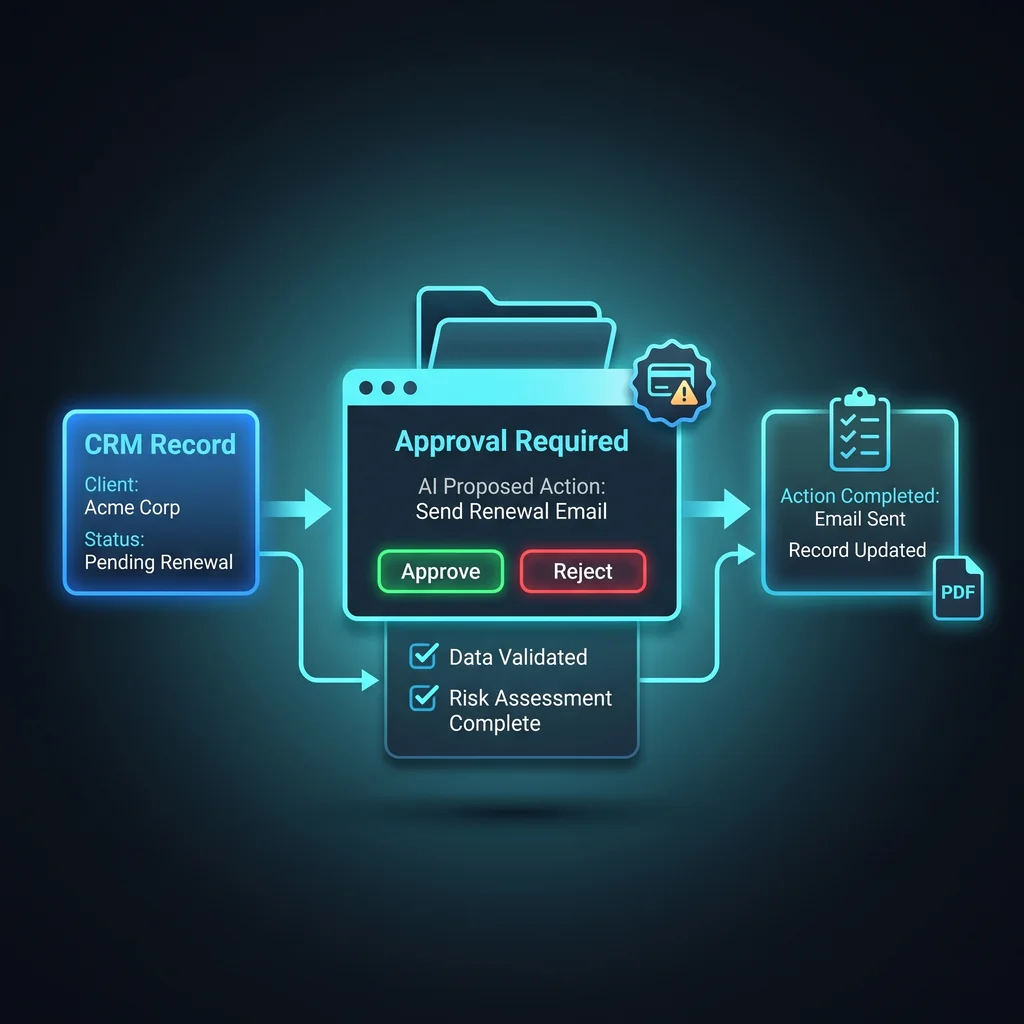
Kansas owners are moving from AI that answers questions to AI that can send messages, update records, move files, and trigger workflow automation. That is where the risk changes. A weak answer is inconvenient. A wrong action inside a CRM, email inbox, file store, or payment process can create cleanup work, upset a customer, or expose private information.
The practical answer is not to block every AI idea. It is to require AI agent approval gates before an agent can touch business operations. An approval gate gives the operator a clear pause point: what is the AI trying to do, why does it think the action is allowed, what evidence supports it, and what happens if it is wrong?
Most small businesses first meet AI through chat: summarize this, draft that, help me find an answer. The next wave connects AI agents to live tools. Once an agent can update a customer record, send an invoice reminder, export a contact list, or change an automation, the business needs AI action verification at the action boundary.
Do not ask AI to be careful after it acts. Require it to prove the action before it runs.
The public PIC Standard frames this problem plainly: verify intent, provenance, and evidence before a high-impact tool call executes. In its model, the agent must emit a structured Action Proposal that can be checked against the intended tool, and high-impact proposals fail closed when trusted evidence is missing. That idea is useful even if a Kansas company starts with a manual checklist before using a technical verifier. Source: PIC Standard.
High-impact does not only mean large payments. For a small business, a bad customer email, a deleted file, a wrong CRM update, or an exported contact list can all create real cleanup work. The test is simple: if the action can change a business record, notify someone outside the company, expose data, spend money, or start a chain of work, it deserves a gate.
Put a gate in front of any AI action that can send external communication, edit customer or vendor records, delete stored material, export private data, or trigger anything that another person will treat as official. The AI can still prepare the work. It should not quietly execute the work without a person or policy approving the proposal.
Workflow tools are powerful because one click can start several steps. If an AI assistant can start a sequence, change a rule, update credentials, or touch audit and user settings, treat those permissions as operational access, not a convenience toggle. With MCP-connected tools, design permissions from inspect-only to controlled execution before giving an agent write access.
An action proposal is a short, structured record created before the AI acts. It should be simple enough for an owner, office manager, or operations lead to read without learning a new platform.
This is the core of small business AI safety: the AI does not receive blanket permission. It earns permission one meaningful action at a time. That approach also makes AI agent governance easier to explain to employees because the rule is visible and repeatable.
For the first 1-2 days, keep it simple. Require the AI to draft the proposed action in plain language, cite the record or document it used, name the destination system, and explain the risk. A person reviews the proposal before the action runs. This can happen in a shared task, ticket, internal message, or approval queue.
After the team agrees on the pattern, move enforcement into the tools over 1-2 weeks. Separate read access from write access. Let AI inspect CRM records, emails, files, and workflow history before it can change anything. Then allow controlled execution only for actions with clear evidence, limited impact, and a known reviewer path.
The gate should match the risk. A draft internal note may only need a quick review. A customer-facing email, data export, file deletion, invoice reminder, or automation change needs a stronger stop point. The goal is not paperwork. The goal is to keep useful AI work from turning into preventable operations cleanup.
Good AI workflow controls also protect employees. Staff should not have to guess whether the AI sent something, changed a record, or acted on weak evidence. A visible action proposal gives everyone the same answer: here is what the agent wanted to do, here is what it used, and here is who approved it.
Expert AI Services helps businesses connect AI to real work without burying teams in more software. The work starts by mapping where an agent can look, where it can suggest, and where it must stop for approval. Learn more about the Kansas-based team behind the approach.
For applied proof, products like SMSai show how focused automation can support communication workflows while keeping the business owner in control. The same thinking applies to CRM updates, file storage, email approvals, and workflow automation tools: less software, more useful workflows, with a model-agnostic stack that fits the job.
Before AI touches operations, require a proposal and a gate. The proposal explains intent, impact, evidence, and the exact action. The gate lets a person approve, block, or ask for more evidence. Start manually, then enforce it inside the tools that matter most. That is how AI action verification becomes practical instead of theoretical, and how Kansas businesses can adopt custom AI services without losing control of the work.
Difficulty Level
Intermediate
Action Item
Add an action proposal step before AI can send, edit, delete, export, or trigger anything in a business system.
Tools Mentioned
PIC Standard, MCP, CRM, email, file storage, workflow automation tools
Time to Implement
1-2 days for a manual checklist; 1-2 weeks for tool-level enforcement