
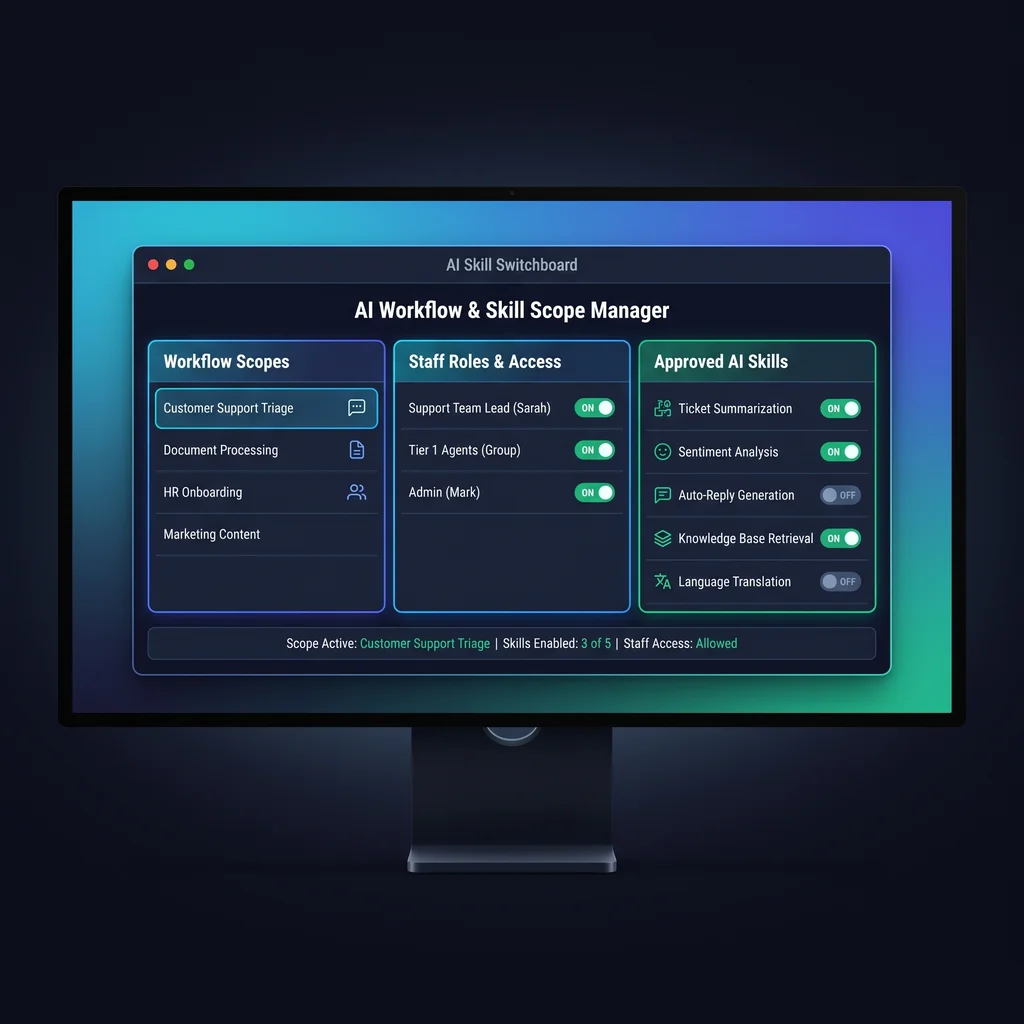
AI skills for small business are moving past prompt experiments. Owners are starting to use reusable instructions, tool connections, and packaged workflows that help staff draft messages, organize records, summarize files, or trigger routine steps. That is useful, but it also changes the question. The issue is no longer only which AI tool looks impressive. The operating question is what the AI can touch, who turned that ability on, and how the team knows it stayed inside the current job.
A skill switchboard is a simple answer. Instead of leaving every AI capability available all the time, the business keeps a visible register of approved skills and turns them on only for the workflow that needs them. The switchboard can be a spreadsheet, a project setup page, or an internal dashboard. The point is not fancy software. The point is owner-visible scope.
That matters for Kansas operators because small teams often run lean. The same person may handle customer follow-up, scheduling, invoices, vendor communication, and reporting. Small business AI tools should reduce that load without creating a hidden layer of permissions that only one technical person understands.
When a team first tries AI, the work usually starts with simple prompts. Someone asks for a draft email, a summary, or a checklist. The risk is limited because the AI is mostly responding inside a chat window. Reusable skills change that. They can carry instructions, connect to files, and support repeatable workflows. That makes them more useful, but it also means they need clearer boundaries.
Claude Skills show how reusable task instructions can be packaged so an assistant can use them in the right context. SkillSwitch points to the operator side of the same pattern: capabilities should be easy to enable, disable, and reason about. Together, they make the case for a visible operating layer between the owner and the AI workflow.
A tool menu says what the AI might use. A switchboard says what is active right now, for whom, and under which approval rule.
A useful switchboard answers four practical questions before an AI workflow starts: who owns the skill, what workflow it is allowed to support, what data it may access, and what approval rule applies before it takes action. Those four fields are enough to prevent most early confusion.
Every skill needs a named owner. This does not have to be a technical role. It can be the person who understands whether the output is useful and appropriate. A customer follow-up skill might belong to the office manager. A reporting skill might belong to the founder or operations lead. Ownership keeps the workflow from becoming a shared mystery.
Write the workflow in plain language. Good examples include draft customer replies, summarize intake notes, prepare weekly job status, or organize vendor questions. Avoid broad labels such as admin help or general assistant. Broad labels make agent permissions harder to enforce because nobody knows where the work begins or ends.
State what the skill may read. That may be a shared folder, a form submission, a transcript, a CRM export, or a single uploaded document. If the AI does not need a source to complete the job, keep that source out of scope. Less access is easier to explain and easier to trust.
The approval rule is the most important column. Use plain options such as draft only, staff review required, owner approval required, or read-only. If a skill can change a record, send a message, trigger an automation, or access sensitive information, it should not be enabled by default.
The first version does not need automation. Start with a one-page skill register. Add columns for skill name, owner, allowed workflow, data access, approval rule, and current status. Then choose three workflows where AI already helps the team or where staff keep repeating the same manual step.
Good starter workflows include drafting customer replies, summarizing intake notes, preparing internal checklists, organizing meeting notes, or creating first-pass reports. Keep the first set small. A beginner-friendly switchboard works because the team can review it quickly and understand the boundaries.
For example, a customer follow-up skill may be allowed to draft SMS replies but not send them without review. A reporting skill may summarize a folder but not change the source files. A sales intake skill may read form submissions but not update the CRM until a staff member approves the next step. Those are AI workflow controls in plain language.
Expert AI Services builds custom AI services around the work a business already needs to get done. A skill switchboard fits that approach because it keeps the conversation practical. Instead of asking whether a business should use AI everywhere, it asks which task needs help, what data is needed, who approves the result, and how the team can shut the skill off.
That same principle applies to product-style workflows such as SMSai, where AI-assisted communication should support staff instead of burying them in another software layer. It also applies to structured project setup work, where a model-agnostic stack can route the right capability to the right step without making every tool available at once.
For owners, the payoff is not a dramatic promise. It is a calmer operating model: fewer mystery automations, clearer responsibility, and less software clutter. The team knows what is active. The owner knows who approved it. The AI stays focused on the job in front of it.
If your team is ready to move from experiments into scoped workflows, Expert AI Services can help turn the first register into a practical custom AI services plan. Talk with an AI integration lead about the skills, permissions, and review points your operation actually needs.
Difficulty Level
Beginner
Action Item
Create a one-page skill register with owner, allowed workflow, data access, and approval rule.
Tools Mentioned
Claude Skills, SkillSwitch
Time to Implement
1-2 hours