
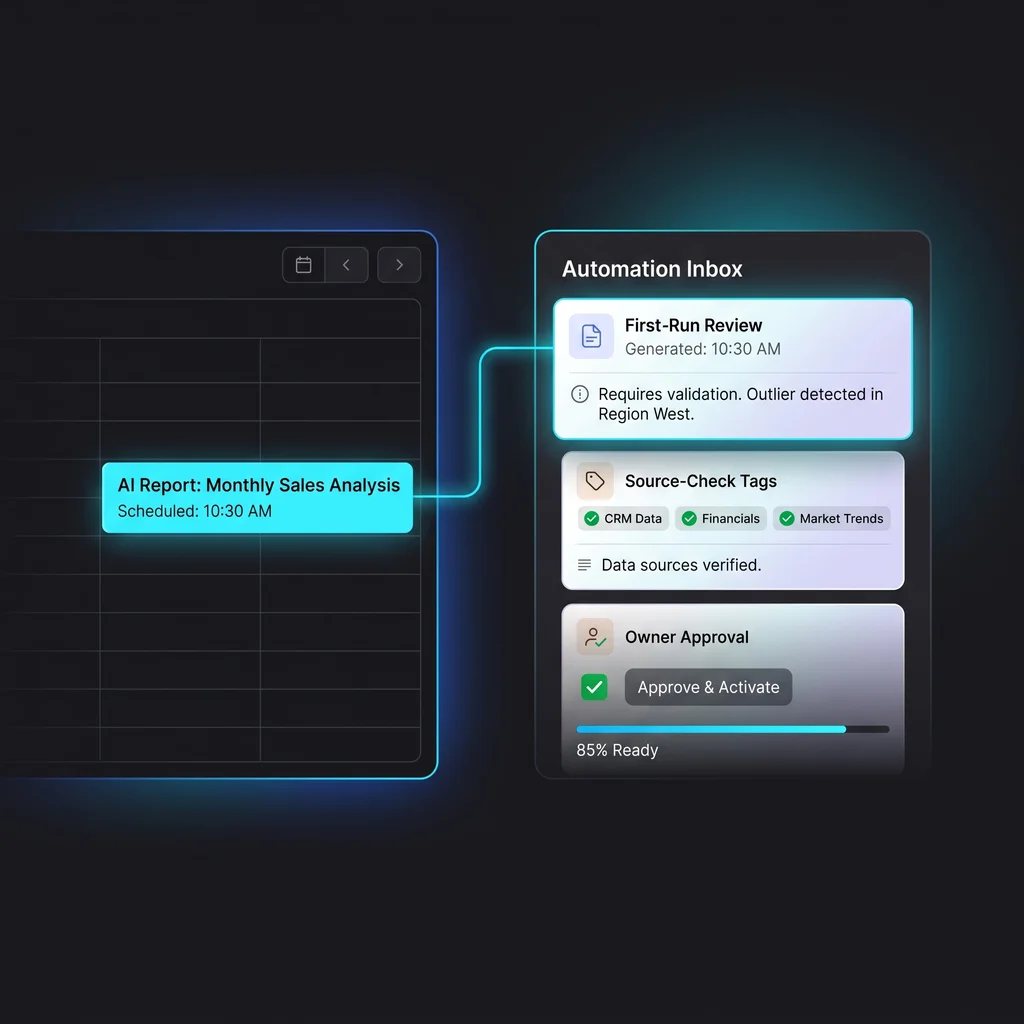
Scheduled AI reports sound simple on paper. Pick a topic, choose a calendar slot, and let an AI agent bring back a useful update every week. For a Kansas business owner, that could mean a Monday sales summary, a supplier price check, a competitor-monitoring note, or a review of open customer follow-ups.
The useful part is not the calendar event. The useful part is knowing the report can be trusted when the week gets busy. That is why scheduled AI reports need a test-run process before they become part of the operating rhythm.
OpenAI's Codex automation guidance points in the same practical direction: recurring tasks can run in the background, place findings in a triage inbox, use skills and plugins, and should be tested manually before they are scheduled. The first few outputs should be reviewed and adjusted before the cadence becomes routine.
A recurring report is different from a one-time AI prompt. A one-time prompt can be corrected on the spot. A recurring task runs when the owner may be busy, traveling, or buried in customer work. If the instruction is vague, the AI can keep making the same wrong choice every Tuesday morning.
That does not make AI automation testing complicated. It just means the job needs a narrow scope, clear source rules, and a visible approval step. The before state is familiar: the owner manually checks sources, writes updates, and forgets recurring review steps during busy weeks. The after state should be better: AI drafts the recurring report, sends findings to a review queue, and the owner approves changes before use.
Start by choosing one report with a clear decision attached to it. Do not ask for every possible update across the company. Ask for one weekly summary that helps answer a question: what changed, what needs attention, and what should wait?
For example, a local operator might want a Friday report on overdue invoices, customer support patterns, or competitor announcements. The AI agent should know which sources are allowed, what counts as a meaningful finding, and what should be ignored.
The review inbox is not extra paperwork. It is the review point that keeps the owner in charge. Codex Automations are designed to surface findings in Triage, which makes the inbox a natural place to review output before it affects decisions.
Good recurring AI work should make the first review easier, not remove the owner's judgment from the process.
The best scheduled report starts as a regular manual run. Write the prompt as if you were training a dependable assistant. Tell it the purpose of the report, the source list, the expected format, the stop conditions, and the type of uncertainty it must call out.
Then run it before the calendar is involved. This is where AI workflow review earns its keep. You are checking whether the report found the right sources, skipped weak sources, made useful distinctions, and produced something a real owner would read.
Manual testing catches problems that a polished automation screen will not show. Maybe the AI pulls too much context. Maybe it checks the wrong folder. Maybe it treats old information as fresh. Maybe the output is technically accurate but too long for a Monday morning.
Use that first run to tighten the prompt. Ask for source-check tags, short notes on what changed, and a clear owner approval checkbox. If the report has nothing meaningful to say, it should say that plainly instead of stretching thin material into a full update.
Source quality matters because recurring AI tasks can quietly drift. A report that started with the right source list may become less useful if a page changes, a feed stops updating, or a connected tool returns partial data.
Make the report show its evidence. For public research, link to the original source. For internal workflow automation, list the system checked and the time window reviewed. Avoid discussion links in public output unless the underlying public source is the actual evidence.
The first scheduled runs are where the workflow proves itself. Do not judge the automation by whether it produced words. Judge it by whether the report helped the owner make a better decision with less follow-up.
OpenAI's automation guidance specifically recommends reviewing the first few outputs and adjusting the prompt or cadence as needed. That is a good operating rule for Kansas companies that need practical value, not another tool to babysit.
Every early run should end with one of three choices. Approve it if the report is useful and sourced well. Adjust it if the format, cadence, or source list needs work. Pause it if the report is not helping the business yet.
This step also protects the team from software clutter. Expert AI Services favors custom AI services that reduce manual toil and keep judgment with the people who know the business. The goal is less software, more useful workflows.
A scheduled report is ready when it has passed the same small test several times: it checks the right places, ignores noise, explains uncertainty, and leaves the owner with a clear next step. It does not need to be fancy. It needs to be dependable.
That is also where a model-agnostic stack helps. The report should be packaged around the business process, not one fragile prompt. Skills, plugins, a review inbox, and a calendar schedule can work together when the workflow is scoped well.
Before you hand recurring reporting to an AI agent, ask practical questions. What source systems are allowed? Who reviews the first outputs? What happens when nothing important changes? What conditions should stop the automation? What should be logged for later review?
Those questions are the difference between a neat demo and a workflow the company can actually use. The Expert AI Services team builds around that kind of operating detail, especially for owners who want useful automation without adding another layer of confusion.
Product examples matter too. SMSai shows the same service philosophy in a focused format: use AI where it removes friction from communication and keeps the workflow practical for real teams.
Scheduled AI reports can save one to three hours per week after setup when they replace forgotten checks, repeated summaries, and manual status writing. The time savings come from narrowing the work, not from asking AI to watch everything at once.
For business owners and operators, the right first move is modest. Pick one recurring report. Test it by hand. Review the first scheduled runs. Keep the source checks visible. Then let the automation keep running only after it has earned trust.
Explore how custom AI services transform operations by talking with an AI integration lead who can help turn recurring reporting into a dependable part of the workweek.
Process Type
Recurring reporting and monitoring
Time Saved
1-3 hours per week after setup
Tools Used
Codex Automations, skills, plugins, review inbox, calendar schedule
Before
Owner manually checks sources, writes updates, and forgets recurring review steps during busy weeks.
After
AI drafts the recurring report, sends findings to a review queue, and the owner approves changes before use.