
A folder full of prompts can feel useful for the first week. Then the same thing happens in many small businesses: one person remembers where the prompt lives, another person copies half of it into ChatGPT or Claude, and nobody is quite sure whether the output is ready to use. That is not a prompt engineering workflow. It is a shortcut with no owner.
A process card fixes that by turning a reusable prompt into a small operating instruction. The card says when to use the prompt, what information must be included, who reviews the result, and how the business knows the work helped. For Kansas owners and operators, that matters because AI only earns trust when it reduces real friction in sales, admin work, customer follow-up, planning, or internal coordination.
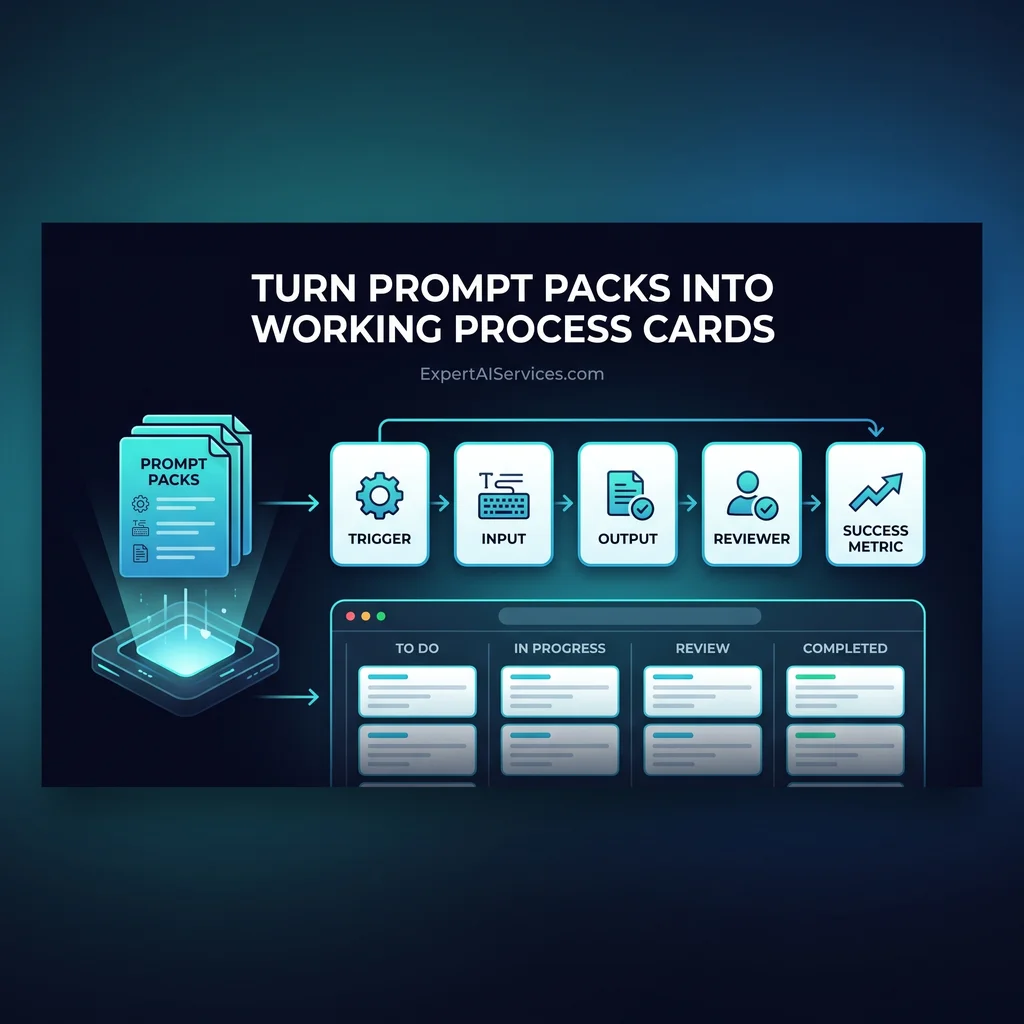
This article keeps the idea simple: take one frequently used prompt and turn it into an AI process card in 30-60 minutes. Do not rebuild your whole company. Start with one recurring task where the same question keeps coming up and the same output is needed more than once.
Prompt libraries are easy to collect and hard to operate. A good prompt might help someone write a better email, summarize a note, or compare options. But if the team does not know when to use it, what source material belongs in it, or who approves the answer, the prompt stays fragile.
That is why AI prompts for business should move from loose examples into working cards. A card gives the prompt a job. It turns the prompt from a personal trick into a shared workflow.
AI becomes more useful when the business can assign the work, check the result, and improve the next run.
A useful process card has five parts. First is the trigger: the moment someone should use the prompt. Second is the input: the customer note, meeting summary, invoice detail, product description, or other source material the AI needs. Third is the output: the thing the person expects back. Fourth is the reviewer: the person who checks the AI's work before it is used. Fifth is the success metric: the plain business result that tells you whether the workflow is worth keeping.
The trigger should be specific enough that a busy person can recognize it. Good triggers sound like this: after a sales call, before a weekly update, when a customer sends a long request, or when a manager needs a first draft of next steps. Weak triggers sound like this: use AI when helpful. That gives the team too much room to guess.
The input section matters because most poor AI output starts with missing context. If the prompt needs a customer note, say that. If it needs the latest price list, say that. If it should only use approved source material, say that too. The prompt should not be asked to fill in facts the business did not provide.
The source material for this topic points toward the same practical lesson. Agentix Labs publishes about AI agents and workflow automation, while the Claudesidian GitHub project shows how Claude Code can work with structured notes and repeatable context. Those are implementation signals, not a reason to chase tools for their own sake. The lesson for an owner is simpler: keep the prompt tied to the work, the files, and the review step.
Pick a prompt your team already uses. Good candidates include writing a follow-up email, summarizing a customer call, drafting a project recap, preparing a weekly update, turning rough notes into a checklist, or comparing two options before a purchasing decision. The task should happen often enough that consistency matters.
Open a shared doc, notes workspace, or simple internal template. Give the card a clear name, such as Customer Follow-Up Draft, Meeting Notes to Action List, or Quote Review Summary. Then paste the current prompt below the card and add the operating details around it. The prompt is no longer the whole asset. It is one part of the workflow.
For the first version, keep the card short. A good small business AI workflow is easier to use than the scattered habit it replaces. If the card requires three pages of instructions, the team will likely avoid it. If it fits on one screen and tells people what to do, it has a better chance of becoming routine.
Imagine a Kansas service company that often sends recap emails after customer calls. The old prompt says, write a professional follow-up email from these notes. The process card makes it usable: trigger after a customer call, required inputs are the call notes and promised next step, output is a draft email under 200 words, reviewer is the account owner, and success metric is fewer rewrites before sending.
Nothing about that example requires a complex system. The business could start in ChatGPT, Claude, or a shared doc. Later, if the workflow proves useful, it may become a better candidate for automation or an AI agent. That order matters. Prove the process before buying the machinery around it.
The review step is what separates a responsible prompt engineering workflow from a risky copy-and-paste habit. AI can draft, summarize, compare, and organize, but a person should still approve work that affects customers, pricing, commitments, hiring, legal language, or financial decisions.
For a beginner-to-intermediate process card, write the review step in plain language. Check names and dates. Confirm the customer request. Remove anything the source material did not support. Make sure the tone matches the business. Verify the next action. Those checks sound basic because they are supposed to be usable by busy people.
This is also where tools should stay in their lane. ChatGPT and Claude may be useful drafting and reasoning tools. Claude Code may help teams that already keep structured notes or technical workflows. Shared docs and a notes workspace may be enough for many operators. The goal is not to force a bigger platform decision. The goal is less software clutter and more useful workflows.
Every AI process card needs a success metric, but it does not need to be complicated. Use a measure the business already understands. Did the card reduce rewrite time? Did it make customer follow-up more consistent? Did it help a manager review work faster? Did it keep recurring tasks from getting lost between people?
If the answer is unclear after a few uses, revise the card. The prompt may need better inputs. The output may be too broad. The reviewer may need a tighter checklist. The trigger may be wrong. Treat the card like an operating habit, not a finished document.
For Expert AI Services, this is where custom AI services become practical. The work is not about collecting clever prompts. It is about helping owners find the repeated steps where AI agents, workflow automation, or a model-agnostic stack can reduce manual toil without replacing judgment. Products like SMSai show the same principle in a different form: useful AI should fit the way a business actually communicates and follows through.
If your team already has prompts but not much consistency, start with one card this week. For help turning scattered AI use into reliable operations, talk with an AI integration lead at Expert AI Services.
Difficulty Level
Intermediate
Action Item
Convert one frequently used prompt into a process card with a trigger, required inputs, review step, and measurable result
Tools Mentioned
ChatGPT, Claude, Claude Code, shared docs, notes workspace
Time to Implement
30-60 minutes for one workflow