
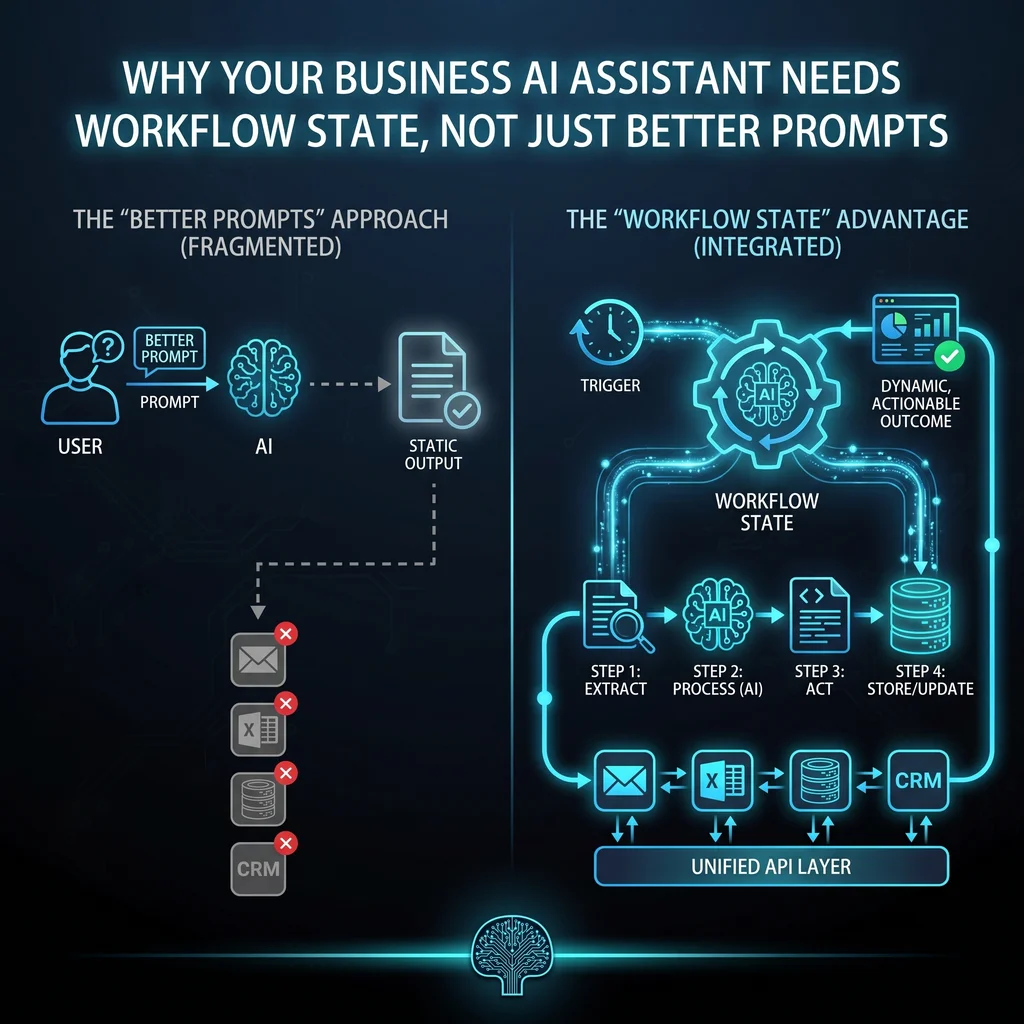
Most business AI assistants fail for a simple reason: they are treated like smarter chat boxes instead of working parts of the operation. A stronger prompt can improve tone, formatting, and first-draft quality. It cannot, by itself, tell the assistant where a job stands, what document is current, who owns the next step, or when a human needs to approve the action.
For Kansas owners and operators, that distinction matters. The goal is not to add another piece of software for the team to babysit. The goal is less software, more useful workflows. An assistant should help coordinators, technicians, office staff, and founders move real work forward without creating a new pile of assumptions to check.
A prompt tells the model how to respond. Workflow state tells the assistant what is actually happening. Those are different jobs. A prompt might say, "write a customer update in a professional tone." Workflow state says the quote is waiting on vendor pricing, the technician already uploaded field notes, the office manager approved the schedule change, and the customer should not receive a final date until parts are confirmed.
A useful business AI assistant does not just answer better. It knows what step the work is in and what it is allowed to do next.
Think about a service coordinator handling emails, forms, calls, and notes from the field. If the assistant cannot see the current task state, it may draft a confident response that misses a hold, repeats a question, or routes the work to the wrong person. That is not a prompt problem. It is a workflow problem.
Workflow state is plain operational context: status, owner, source document, next action, approval requirement, deadline, and escalation trigger. It gives an AI agent enough structure to be helpful without pretending it should run the whole business from a chat window.
Memory should have boundaries. A business assistant may need to remember the preferred format for customer updates, the steps in an intake process, or the latest status of a work order. It does not need open-ended memory across every conversation and document. Narrow memory is easier to verify, easier to audit, and easier for employees to trust.
A document store helps the assistant answer from the right source instead of guessing from a general model. For example, the assistant can retrieve a job packet, proposal, drawing note, or standard operating procedure before drafting a response. That is especially important for companies with field coordination, building systems, low-voltage, controls, or operations-heavy work where details change fast and the wrong detail can cost time.
Professional users are moving away from the idea that every business process should become an open-ended agent. Predictable work should stay in deterministic workflows. Triggers, routing, approvals, logs, and permissions should be clear. The AI layer should inspect, summarize, draft, classify, or flag exceptions inside that structure.
Let the assistant handle uncertain steps: interpreting a messy request, summarizing a document, suggesting a next action, drafting an email, or identifying missing information. These are places where language understanding saves time and reduces manual toil.
Let the workflow handle repeatable gates: assigning the owner, moving a task from intake to review, requiring approval before a message goes out, logging a completed action, and escalating when a deadline or permission rule is hit. Modern workflow automation and MCP-style connections make it practical for AI to inspect and trigger existing workflows without replacing the automation layer.
More verification can improve safety, but longer tool-using tasks still need recovery paths. If the assistant is allowed to touch documents, route work, or prepare customer communication, it needs stop conditions. It should know when it can proceed, when it must ask for confirmation, and when it should hand work to a person.
Useful stop conditions are specific. Do not send a quote without approval. Do not update a customer if the source document conflicts with the task status. Do not mark a job complete if required fields are missing. Do not keep retrying a failed action without notifying the owner. These rules keep AI helpful to the working team instead of adding one more thing to supervise.
Start with one recurring process that already creates friction. Good candidates include intake, RFQ follow-up, document review, appointment coordination, customer updates, internal handoffs, or field-to-office notes. Do not start with the flashiest prompt. Start with the workflow people already have to repeat.
Then define the state fields. What is the status? Who owns it? What document is the source of truth? What is the next action? Is approval required? What deadline matters? What should trigger escalation? Once those answers are clear, the prompt gets simpler because the assistant is no longer guessing the operating context.
Expert AI Services approaches this from practical integration, not hype. The local team brings building-systems experience into custom AI services, with a focus on tools that simplify coordination instead of replacing the people doing the work. Products like SMSai show the same principle in action: use AI where it reduces manual back-and-forth, then keep the workflow bounded enough for real operations.
Clear prompts still help. They shape tone, format, and task behavior. But prompts should sit on top of workflow state, not substitute for it. Without task ownership, document retrieval, approval gates, and escalation rules, a polished answer can still be operationally wrong.
The businesses that get value from AI assistants will be the ones that connect them to the systems where work already happens. For Kansas companies, that means a model-agnostic stack, sensible workflow automation, and AI agents that understand the job, the document, the next step, and the limit of their own authority.
Difficulty Level
Action Item
Tools Mentioned
Time to Implement